PS1: The second modification, which currently supports the data transfer of classification, article and tag
PS2: If the article ID is always correct, you can try to empty the WordPress article classification data table and relationship table
I used to blog with typecho, and later moved to the empire, but the empire functions too much, the blog with the empire is a little overqualified feeling!
Moreover, I use the blog I often record some important code, these code are I worked hard to write, how can't say white luck, right?
So I think of paying for knowledge, but the empire, I don't want to toss about, simply moved to wordpress!
After all, wordpress is suitable for the blog...... This is not to say that the empire is not fit for construction
The following migration detailed record and code are summarized here.
Step 1: Build a wordpress
The official website can download wordpress, the installation can be installed.
Step 2: Install the tool for importing the data
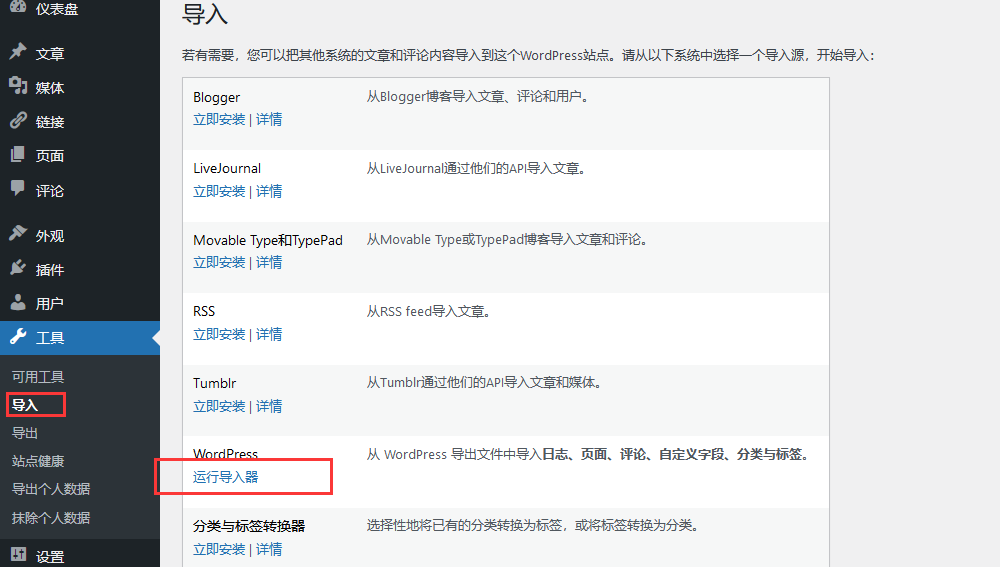
Step 3: Export the data from the empire
Here the export data needs to use code, only export articles and classification, classification url if the rules, can be kept unchanged, if there is a different url form under each classification, that is not good
Build a etow.php in the root directory of your empire website, and then put the following code in, visit this PHP to see xml data, at this time Ctrl + S save, save as xml file
<?php
header("Content-type:text/xml");

$site = "https://www.4s5.cn";//修改成自己的网站链接
$sitename = "站点名称";//站点名称,自己修改

echo
<<<EOD
<?xml version="1.0" encoding="UTF-8" ?>
<!-- This is a WordPress eXtended RSS file generated by WordPress as an export of your site. -->
<!-- It contains information about your site's posts, pages, comments, categories, and other content. -->
<!-- You may use this file to transfer that content from one site to another. -->
<!-- This file is not intended to serve as a complete backup of your site. -->

<!-- To import this information into a WordPress site follow these steps: -->
<!-- 1. Log in to that site as an administrator. -->
<!-- 2. Go to Tools: Import in the WordPress admin panel. -->
<!-- 3. Install the "WordPress" importer from the list. -->
<!-- 4. Activate & Run Importer. -->
<!-- 5. Upload this file using the form provided on that page. -->
<!-- 6. You will first be asked to map the authors in this export file to users -->
<!--    on the site. For each author, you may choose to map to an -->
<!--    existing user on the site or to create a new user. -->
<!-- 7. WordPress will then import each of the posts, pages, comments, categories, etc. -->
<!--    contained in this file into your site. -->

  <!-- generator="WordPress/6.1.1" created="2023-02-05 09:40" -->
<rss version="2.0"
  xmlns:excerpt="http://wordpress.org/export/1.2/excerpt/"
  xmlns:content="http://purl.org/rss/1.0/modules/content/"
  xmlns:wfw="http://wellformedweb.org/CommentAPI/"
  xmlns:dc="http://purl.org/dc/elements/1.1/"
  xmlns:wp="http://wordpress.org/export/1.2/"
>

<channel>
  <title>{$sitename}</title>
  <link>{$site}</link>
  <description></description>
  <pubDate>Sun, 05 Feb 2023 09:40:05 +0000</pubDate>
  <language>zh-CN</language>
  <wp:wxr_version>1.2</wp:wxr_version>
  <wp:base_site_url>{$site}</wp:base_site_url>
  <wp:base_blog_url>{$site}</wp:base_blog_url>

    <wp:author><wp:author_id>1</wp:author_id><wp:author_login><![CDATA[1810216796]]></wp:author_login><wp:author_email><![CDATA[1810216796@qq.com]]></wp:author_email><wp:author_display_name><![CDATA[1810216796]]></wp:author_display_name><wp:author_first_name><![CDATA[]]></wp:author_first_name><wp:author_last_name><![CDATA[]]></wp:author_last_name></wp:author>

EOD;
require('e/class/connect.php');        //引入数据库配置文件和公共函数文件
require('e/class/db_sql.php');        //引入数据库操作文件
$link=db_connect();                //连接MYSQL
$empire=new mysqlquery();        //声明数据库操作类
$allcass = array();
$allcass_name = array();

//分类处理
$sql=$empire->query("SELECT classid,classpath,classname FROM `phome_enewsclass` where bclassid = 0");        //一级分类
while($r=$empire->fetch($sql))        //循环获取查询记录
{
        echo"    <wp:category>
    <wp:term_id>{$r['classid']}</wp:term_id>
    <wp:category_nicename><![CDATA[{$r['classpath']}]]></wp:category_nicename>
    <wp:category_parent><![CDATA[]]></wp:category_parent>
    <wp:cat_name><![CDATA[{$r['classname']}]]></wp:cat_name>
  </wp:category>
  ";
  $allcass[$r['classid']] =  $r['classpath'];
  $allcass_name[$r['classid']] = $r['classname'];
  $sql2=$empire->query("select classid,classpath,classname from {$dbtbpre}enewsclass where bclassid=$r[classid] ");      //二级分类
    while($s2=$empire->fetch($sql2)){
        $s2['classpath'] = str_replace($r['classpath'].'/','',$s2['classpath']);
        echo "<wp:category>
    <wp:term_id>{$s2['classid']}</wp:term_id>
    <wp:category_nicename><![CDATA[{$s2['classpath']}]]></wp:category_nicename>
    <wp:category_parent><![CDATA[{$r['classpath']}]]></wp:category_parent>
    <wp:cat_name><![CDATA[{$s2['classname']}]]></wp:cat_name>
  </wp:category>
  ";
  $allcass[$s2['classid']] =  $s2['classpath'];
  $allcass_name[$s2['classid']] = $s2['classname'];
  $sql3=$empire->query("select classid,classpath,classname from {$dbtbpre}enewsclass where bclassid=$s2[classid] ");      //二级分类
    while($s3=$empire->fetch($sql3)){
        $s3['classpath'] = str_replace($s2['classpath'].'/','',$s3['classpath']);
        $allcass[$s3['classid']] =  $s3['classpath'];
        $allcass_name[$s3['classid']] = $s3['classname'];
        echo "<wp:category>
    <wp:term_id>{$s3['classid']}</wp:term_id>
    <wp:category_nicename><![CDATA[{$s3['classpath']}]]></wp:category_nicename>
    <wp:category_parent><![CDATA[{$s2['classpath']}]]></wp:category_parent>
    <wp:cat_name><![CDATA[{$s3['classname']}]]></wp:cat_name>
  </wp:category>
  ";
    }
    }
}

//TAG处理
$sql=$empire->query("SELECT * FROM `phome_enewstags`");
while($r=$empire->fetch($sql))        //循环获取查询记录
{
    $r['tagid'] = $r['tagid'] + 24;
  echo "
  <wp:tag>
		<wp:term_id>{$r['tagid']}</wp:term_id>
		<wp:tag_slug><![CDATA[{$r['tagname']}]]></wp:tag_slug>
		<wp:tag_name><![CDATA[{$r['tagname']}]]></wp:tag_name>
	</wp:tag>
	<wp:term>
		<wp:term_id>{$r['tagid']}</wp:term_id>
		<wp:term_taxonomy><![CDATA[post_tag]]></wp:term_taxonomy>
		<wp:term_slug><![CDATA[{$r['tagname']}]]></wp:term_slug>
		<wp:term_parent><![CDATA[]]></wp:term_parent>
		<wp:term_name><![CDATA[{$r['tagname']}]]></wp:term_name>
	</wp:term>
	";
	$tagArray[$r['tagid']] = $r['tagname'];
}

//term处理
$sql=$empire->query("SELECT classid,classpath,classname FROM `phome_enewsclass` where bclassid = 0");
while($r=$empire->fetch($sql))        //循环获取查询记录
{
        echo"    <wp:term>
    <wp:term_id>{$r['classid']}</wp:term_id>
    <wp:term_taxonomy><![CDATA[category]]></wp:term_taxonomy>
    <wp:term_slug><![CDATA[{$r['classpath']}]]></wp:term_slug>
    <wp:term_parent><![CDATA[]]></wp:term_parent>
    <wp:term_name><![CDATA[{$r['classname']}]]></wp:term_name>
  </wp:term>
  ";

  $sql2=$empire->query("select classid,classpath,classname from {$dbtbpre}enewsclass where bclassid=$r[classid] ");
    while($s2=$empire->fetch($sql2)){
        $s2['classpath'] = str_replace($r['classpath'].'/','',$s2['classpath']);
        echo "<wp:term>
    <wp:term_id>{$s2['classid']}</wp:term_id>
    <wp:term_taxonomy><![CDATA[category]]></wp:term_taxonomy>
    <wp:term_slug><![CDATA[{$s2['classpath']}]]></wp:term_slug>
    <wp:term_parent><![CDATA[{$r['classpath']}]]></wp:term_parent>
    <wp:term_name><![CDATA[{$s2['classname']}]]></wp:term_name>
  </wp:term>
  ";

  $sql3=$empire->query("select classid,classpath,classname from {$dbtbpre}enewsclass where bclassid=$s2[classid] ");
    while($s3=$empire->fetch($sql3)){
        $s3['classpath'] = str_replace($s2['classpath'].'/','',$s3['classpath']);
        echo "<wp:term>
    <wp:term_id>{$s3['classid']}</wp:term_id>
    <wp:term_taxonomy><![CDATA[category]]></wp:term_taxonomy>
    <wp:term_slug><![CDATA[{$s3['classpath']}]]></wp:term_slug>
    <wp:term_parent><![CDATA[{$r['classpath']}]]></wp:term_parent>
    <wp:term_name><![CDATA[{$s3['classname']}]]></wp:term_name>
  </wp:term>
  ";
    }
    }
}
echo '  <generator>https://wordpress.org/?v=6.1.1</generator>
';

//文章处理
$sql=$empire->query("SELECT * FROM `phome_ecms_news`");        //文章处理
while($r2=$empire->fetch($sql))        //循环获取查询记录
{
    // $r2['titleurl'] = str_replace('www','wp',$r2['titleurl']);
    $time1 = date("H:i:s",$r2['lastdotime']);
    $time2 = date("Y",$r2['lastdotime']);
    $time3 = date("m",$r2['lastdotime']);
    $time4 = date("d",$r2['lastdotime']);
    $title = urlencode($r2['title']);
    $classname = $allcass_name[$r2['classid']];
    $classpatch = $allcass[$r2['classid']];
    // $markdown = $converter->convert($r2['newstext']);
    $markdown = str_replace('<pre>','<pre class="enlighter-pre" mce-contenteditable="false"><code class="gl">',$r2['newstext']);
    $markdown = str_replace('</pre>','</code></pre>',$markdown);

     $markdown = str_replace(' class="title"','',$markdown);
     $markdown = str_replace('\"','"',$markdown);
    $markdown = str_replace('/d/file/','/wp-content/uploads/',$markdown);
    $markdown = str_replace('<h2>个人备注:</h2>','<h4>个人备注:</h4>',$markdown);

    $tags = '';
    //tag查询
    $sql2 = $empire->query("SELECT * FROM `phome_enewstagsdata` WHERE `id` = {$r2['id']} ");
    while($r3=$empire->fetch($sql2)){
        $r3['tagid'] = $r3['tagid'] + 24;
        $tags .= '<category domain="post_tag" nicename="'.$tagArray[$r3['tagid']].'"><![CDATA['.$tagArray[$r3['tagid']].']]></category>';
    }


        echo
<<<EOD
<item>
    <title><![CDATA[{$r2['title']}]]></title>
    <link>{$r2['titleurl']}</link>
    <pubDate>Sun, {$time4} Feb {$time2} {$time1} +0000</pubDate>
    <dc:creator><![CDATA[1810216796]]></dc:creator>
    <guid isPermaLink="false">{$site}/?p={$r2['id']}</guid>
    <description></description>
    <content:encoded><![CDATA[{$markdown}]]></content:encoded>
    <excerpt:encoded><![CDATA[]]></excerpt:encoded>
    <wp:post_id>{$r2['id']}</wp:post_id>
    <wp:post_date><![CDATA[{$time2}-{$time3}-{$time4} {$time1}]]></wp:post_date>
    <wp:post_date_gmt><![CDATA[{$time2}-{$time3}-{$time4} {$time1}]]></wp:post_date_gmt>
    <wp:post_modified><![CDATA[{$time2}-{$time3}-{$time4} {$time1}]]></wp:post_modified>
    <wp:post_modified_gmt><![CDATA[{$time2}-{$time3}-{$time4} {$time1}]]></wp:post_modified_gmt>
    <wp:comment_status><![CDATA[open]]></wp:comment_status>
    <wp:ping_status><![CDATA[open]]></wp:ping_status>
    <wp:post_name><![CDATA[{$title}]]></wp:post_name>
    <wp:status><![CDATA[publish]]></wp:status>
    <wp:post_parent>0</wp:post_parent>
    <wp:menu_order>0</wp:menu_order>
    <wp:post_type><![CDATA[post]]></wp:post_type>
    <wp:post_password><![CDATA[]]></wp:post_password>
    <wp:is_sticky>0</wp:is_sticky>
    {$tags}
                    <category domain="category" nicename="{$classpatch}"><![CDATA[{$classname}]]></category>
            <wp:postmeta>
    <wp:meta_key><![CDATA[_edit_last]]></wp:meta_key>
    <wp:meta_value><![CDATA[1]]></wp:meta_value>
    </wp:postmeta>
              <wp:postmeta>
    <wp:meta_key><![CDATA[_wp_page_template]]></wp:meta_key>
    <wp:meta_value><![CDATA[default]]></wp:meta_value>
    </wp:postmeta>
              </item>
EOD;

}

echo '
        </channel>
</rss>
  ';

db_close();                        //关闭MYSQL链接
$empire=null;

?>
Because my blog data is relatively small, about thousands, so directly step exported, if your website data is too much, you can contact me to modify the code for free!
Step 4: Import the wordpress

So you can transfer your imperial data to the wordpress