Hongmu Notes
Home Practical Collection empire plugin

empire plugin

The EmpireCMS Development Center is built upon the EmpireCMS website management system and primarily focuses on providing EmpireCMS plugins, secondary development of EmpireCMS website templates, EmpireCMS tutorials, and high-end website replication services. It offers a comprehensive suite of services for secondary development of EmpireCMS, encompassing plugin development, design, sales, and support.

EmpireCMS 7.5 – Generate sitamap.xml mapping plugin

EmpireCMS 7.5 – Generate sitamap.xml mapping plugin Practical Collection empire plugin

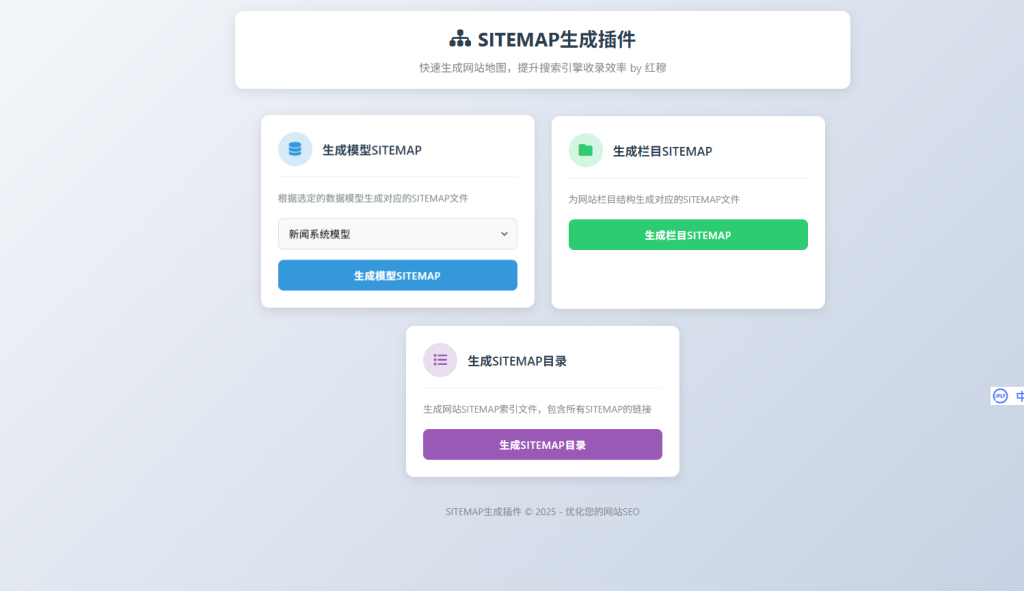
First, here's a screenshot: 20251003193735549-sitemap_w8WEJ.tar.gz – Download the.tar.gz file (5.7 KB). The code was found online and has been slightly optimized. First, please ensure that the website address in the system settings is filled in correctly. Additionally, the URL in the config.php file must also be entered accurately. I recommend placing the sitemap.xml file in the root directory for easier web crawling...

👁 225
EmpireCMS 7.5 Batch Import Plugin for TXT-format articles – supports importing up to 2,000,000 articles per day.

EmpireCMS 7.5 Batch Import Plugin for TXT-format articles – supports importing up to 2,000,000 articles per day. Practical Collection empire plugin

It sounds simple – yet it's actually quite complex! Empire CMS boasts an astonishingly high article capacity – which means some users need to import articles in bulk into Empire CMS. That's how this plugin was born! Configuration PHP code: <?php // Directory where the TXT file is stored $AddNews['target'] = 'Physical Science 16–30,000'; // Category ID $AddNews['class'] =...
👁 340
What is the optimal number of data sub-tables for EmpireCMS? How should published data be distributed across sub-tables? How can a million records in EmpireCMS be evenly distributed across multiple sub-tables?

What is the optimal number of data sub-tables for EmpireCMS? How should published data be distributed across sub-tables? How can a million records in EmpireCMS be evenly distributed across multiple sub-tables? Program Notes Empire cms Practical Collection empire plugin

How many data rows should be split into separate tables for EmpireCMS? 1. For a database size of 50 GB, it is advisable to create a new main table; 2. For a dataset of 50,000 rows or more, create a new secondary table and set this newly created secondary table as the current storage table; [Some recommend splitting the entire dataset into a single table when the data volume reaches 100,000 rows.] An excessively large dataset has resulted in extremely high I/O read/write operations on the MySQL database, leading to excessive server load. This is particularly noticeable when performing backend operations in EmpireCMS – especially for sections with large data volumes; this was the case on my website before I implemented table partitioning...
👁 683
EmpireCMS Batch Column Addition Plugin

EmpireCMS Batch Column Addition Plugin Practical Collection empire plugin

1. Powerful functionality: Automatically generates Pinyin-based table of contents; allows for quick, unified configuration of parent categories; supports recognition of custom parent categories. 2. User-friendly interface: Except for category names and table of contents settings, all other features follow the same configuration methods as those provided by the system itself, making it easy to get started. Custom category fields can also be configured in bulk. ******************** Installation Guide ********************
👁 332
Empire Toolbox V1.0

Empire Toolbox V1.0 Practical Collection empire plugin

As a webmaster who frequently uses Empire CMS, I often find certain operations to be particularly cumbersome! For example, I might want to change the Empire CMS database table prefix; or perhaps I want to batch modify the thumbnails for all articles collected from an external source; or if the images in the collected articles have become invalid, I might want to randomly replace them with new images; or I might want to batch delete other unnecessary tables from the Empire CMS database; or perhaps I've forgotten my Empire CMS admin panel password...
👁 442
After running the Empire CMS automatic installation script, the system will redirect you to the login page.

After running the Empire CMS automatic installation script, the system will redirect you to the login page. Practical Collection empire plugin

It's so annoying – every time I need to install the Empire CMS template, I have to manually delete the `install.lock` file and then proceed step by step! After completing each step, I still have to manually enter the database credentials and initial password! This is really frustrating! So, I wrote a PHP script with the following basic functionality: it eliminates the need to manually access the `/e/install` directory or delete the `lock` file; when the script is run, it automatically installs Empire CMS and then redirects the user to the Empire CMS homepage...
👁 230
Empire CMS 7.5 Baidu Active/Batch Push Plugin

Empire CMS 7.5 Baidu Active/Batch Push Plugin Practical Collection empire plugin

This plugin is compatible with EmpireCMS 7.5 and 7.2 (UTF-8 versions); its installation and uninstallation process is simple and straightforward. Many novice webmasters using EmpireCMS may often struggle with how to automatically push newly published articles to Baidu in real time. If website articles are not regularly submitted to Baidu, website indexing will be significantly delayed, which can negatively impact SEO performance. Especially for content aggregators, manually submitting articles would be a tedious and time-consuming task...
👁 341
EmpireCMS AutoTitlePic – Automatically generates title images

EmpireCMS AutoTitlePic – Automatically generates title images Practical Collection empire plugin

AutoTitlePic – a plugin that automatically generates article title images. When building a website, image copyright issues often arise; in such cases, having a plugin to generate thumbnails becomes extremely important! I have customized this plugin by adding a scheduled generation feature, allowing images to be automatically generated during periods of low site traffic – this can be seamlessly integrated with the scheduled tasks functionality in Baota. Key features: 1. Easy installation and simple to use; compatible with both existing and new websites. 2....
👁 419
Insert related articles in the middle of imperial cms articles (article page optimization, the effect is super good)

Insert related articles in the middle of imperial cms articles (article page optimization, the effect is super good) Practical Collection empire plugin

Those who understand will know – this feature allows you to aggregate related articles. By displaying these articles in the middle of the main content, it not only enhances the user experience but also achieves effective optimization. I've noticed that many high-authority websites are already using this feature, so I spent several hours researching it and wrote this tutorial! The benefit for website optimization is significant – I'm sure even seasoned SEO experts will agree! This feature was suggested to me by an experienced website optimization expert; I hope it will be helpful to all webmasters! Whether you run a content aggregation site or...
👁 474