Hongmu Notes
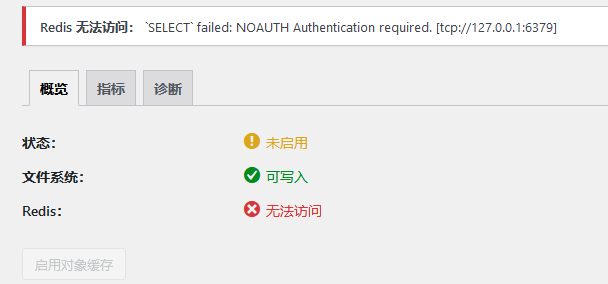
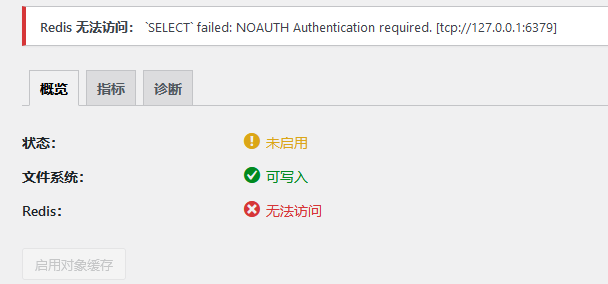
Home Program Notes After installing Redis on WordPress, setting a password prevented Redis from connecting; as a result, Redis could not be accessed: `SELECT` Failed: NOAUTH – Authentication required.
Program Notes Summary of pitfalls wordpress

After installing Redis on WordPress, setting a password prevented Redis from connecting; as a result, Redis could not be accessed: `SELECT` Failed: NOAUTH – Authentication required.

After installing Redis on WordPress, setting a password prevented Redis from connecting; as a result, Redis could not be accessed: `SELECT` Failed: NOAUTH – Authentication required.

This is the most widely used article online – it can solve 80% of Redis-related issues!
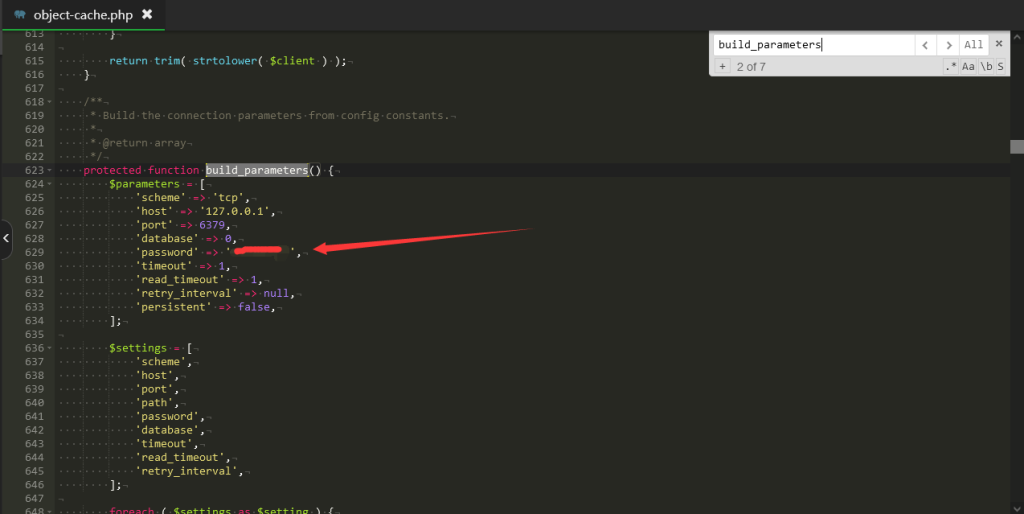
What should I do if the Redis Object Cache plug-in cannot be linked after wordpress redis changes the password?

20231006124959774-图片

Of course, an additional 20% needs to be contributed.wp-config.phpLet's go!

terms of settlement

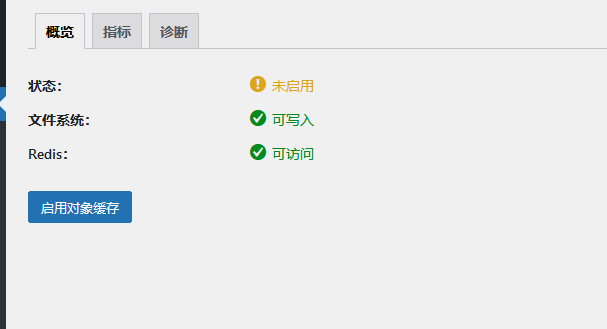
I was previously using the Redis plugin.object-cache.phpThe document contained Redis-related code, but it didn't work this time. After searching for a long time, I finally found a solution!

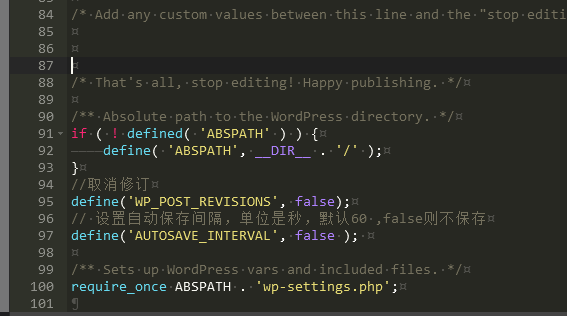
Open this.wp-config.phpdocument!

Add the following code:

define('WP_REDIS_PASSWORD', '你的密码'); # Redis密码
20231006125159250-图片

Redis Other Configuration Parameters

define('WP_REDIS_CLIENT', 'pecl'); # 指定用于与Redis通信的客户端, pecl 即 The PHP Extension Community Library
define('WP_REDIS_SCHEME', 'tcp'); # 指定用于与Redis实例进行通信的协议
define('WP_REDIS_HOST', '127.0.0.1'); # Redis服务器的IP或主机名
define('WP_REDIS_PORT', '6379'); # Redis端口
define('WP_REDIS_DATABASE', '0'); # 接受用于使用该SELECT命令自动选择逻辑数据库的数值
define('WP_REDIS_PASSWORD',''); # Redis密码
define('WP_CACHE_KEY_SALT', 'wp_'); # 设置所有缓存键的前缀(Wordpress多站点模式下使用)
define('WP_REDIS_MAXTTL', '86400');


微信赞赏

WeChat

支付宝赞赏

Alipay

✍️ Author: Hong Mu

webmaster · Thanks for reading, stay tuned for more exciting content

Author homepage View home page →

Related articles

How to make WordPress fly? I used SQLite to defeat Redis

How to make WordPress fly? I used SQLite to defeat Redis Program Notes Summary of pitfalls wordpress

My website runs on WordPress + Zibi theme. Zibi knows everything about this thing - login, membership, download permissions, QQ login, reply visibility...it is packed with functions, and the database needs to be checked dozens of times every time it is refreshed. So I wanted to simply transform it. The code has been put in place. https://github.com/1810216796/wordpress-sqlite-cach…
👁 92
What should I do if the Redis Object Cache plug-in cannot be linked after wordpress redis changes the password?

What should I do if the Redis Object Cache plug-in cannot be linked after wordpress redis changes the password? Program Notes wordpress

Problem description: My wordpress site server uses pagoda panel, installed php8.0, and installed redis on the extension panel, and installed Redis Object Cache plug-in in wordpress. In fact, in general, you don't need to do anything, just start it directly. However, it is unsafe for radis not to set a password, which is a risky loophole, so I still think it is better to set a password, …
👁 255
How do I disable revisions and automatic draft saving in WordPress?

How do I disable revisions and automatic draft saving in WordPress? Program Notes wordpress

WordPress's automatic article revision tracking feature logs every time you edit an article in the后台; each revision is recorded as a separate entry in the `wp_posts` table. Due to the interplay between article revisions and automatic saving, the article ID often grows larger over time. While this typically does not cause significant issues for your WordPress installation, an excessive number of article versions can place a considerable burden on your storage space and database...
👁 372
Detailed Tutorial on Migrating EmpireCMS Blog Data to WordPress

Detailed Tutorial on Migrating EmpireCMS Blog Data to WordPress Program Notes wordpress

PS1: Second revision – now supports data transfer between categories, posts, and tags. PS2: If the post IDs consistently don't match, you can try clearing the WordPress post category data table and relationship tables. I previously used Typecho for my blog, but later migrated to Empire; however, Empire has too many features – using it for a blog feels like putting a large hammer into a small hole! Additionally, I often record important code snippets in my blog – all of which I've painstakingly written...
👁 546
WordPress issue: pages freezing due to image transcoding

WordPress issue: pages freezing due to image transcoding Program Notes wordpress

Last night, while uploading an image, for some reason, the uploaded image was automatically transcoded. Transcoding type: BASE64 encoding. For an image on a website, simply upload it to your server and then access the link – the image will then be displayed. However, there is another approach: directly transcoding the image; then you can simply access the converted image using its encoded URL. Problem description: When an image is relatively small (e.g., only a few KB in size), transcoding it and then hosting it on a website can help avoid...
👁 152
WordPress database query operations

WordPress database query operations Program Notes wordpress

To connect to a database for a WordPress installation, you need to include the `wp-config.php` file in your PHP script. This file contains the database configuration details for WordPress installation and other constants. Here is a simple example demonstrating how to include the `wp-config.php` file and establish a database connection: // Include the wp-config.php file: require...
👁 377

Recommended reading

Convert Python Markdown to HTML

Convert Python Markdown to HTML Language Notes python

You can use the `markdown` module in Python to convert Markdown to HTML. Here is an example code: `import markdown # Read the content of a Markdown file with open('example.md', 'r') as f: markdown_text = f.read()` # Convert Markdown...
👁 241
(Adaptive Mobile Version) Responsive Consulting Management Website PBootCMS Template – Download HTML5 Enterprise Consulting Agency Website Source Code – 0149

(Adaptive Mobile Version) Responsive Consulting Management Website PBootCMS Template – Download HTML5 Enterprise Consulting Agency Website Source Code – 0149 Practical Collection pbootcms Template

This adaptive mobile-responsive PbootCMS website template for consultation management purposes is built using HTML5 technology. Its professional and authoritative design effectively showcases corporate management consulting services, expert teams, and successful case studies. It is an excellent choice for management consulting firms looking to establish a branded official website and attract corporate clients. Template Display | Installation Instructions | Website Backend: /admin.php | Username: admin | Password: admin | Extraction Password:...
👁 39
(Adaptive mobile version) pbootCMS Steel Processing Website Template – Download source code for steel cutting and steel sales websites – 0801

(Adaptive mobile version) pbootCMS Steel Processing Website Template – Download source code for steel cutting and steel sales websites – 0801 Practical Collection pbootcms Template

A PbootCMS website template for steel processing and sales, compatible with both PC and WAP devices. Its rugged, professional design effectively showcases steel product specifications, processing services, and inventory information. This template helps steel trading enterprises demonstrate their capabilities online and attract construction and manufacturing clients. Template Display | Installation Instructions | Website Backend: /admin.php | Username: admin | Password: admin | Extraction Password: www.4s5.cn...
👁 53
Mechanical snow clearing equipment website template 0286

Mechanical snow clearing equipment website template 0286 Practical Collection Yiyou template

An eyoucms website template for mechanical snow clearing equipment companies. The design style is professional and practical, and can display snow clearing equipment products, technical parameters, industrial applications and engineering cases. It helps machinery and equipment companies display their products online and attract municipal and property customers. Template display Installation instructions Website backend: /login.php Account: admin Password: admin Related articles Summary of common problems in Yiyou CMS installation Yi...
👁 54
Responsive fashion brand eyewear and accessories website template – 0968

Responsive fashion brand eyewear and accessories website template – 0968 Practical Collection Yiyou template

An eyouCMS responsive website template designed for the eyewear and accessory industry. Its stylish and sophisticated design is ideal for showcasing eyewear products, accessory collections, brand identity, and new product launches – helping eyewear and accessory brands attract fashion-conscious consumers online. Template Demo | Installation Instructions | Website Backend: /login.php | Username: admin | Password: admin | Related Articles: Summary of Common Installation Issues for YouYouCMS | YouYouCMS...
👁 58