Hongmu Notes
Home Program Notes When editing articles in the EMLOG backend, automatic saving and display of word count statistics are enabled.
Program Notes emlog

When editing articles in the EMLOG backend, automatic saving and display of word count statistics are enabled.

When editing articles in the EMLOG backend, automatic saving and display of word count statistics are enabled.

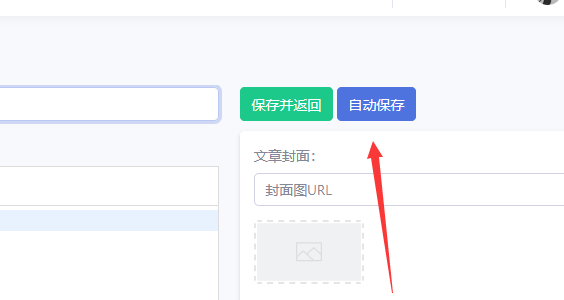
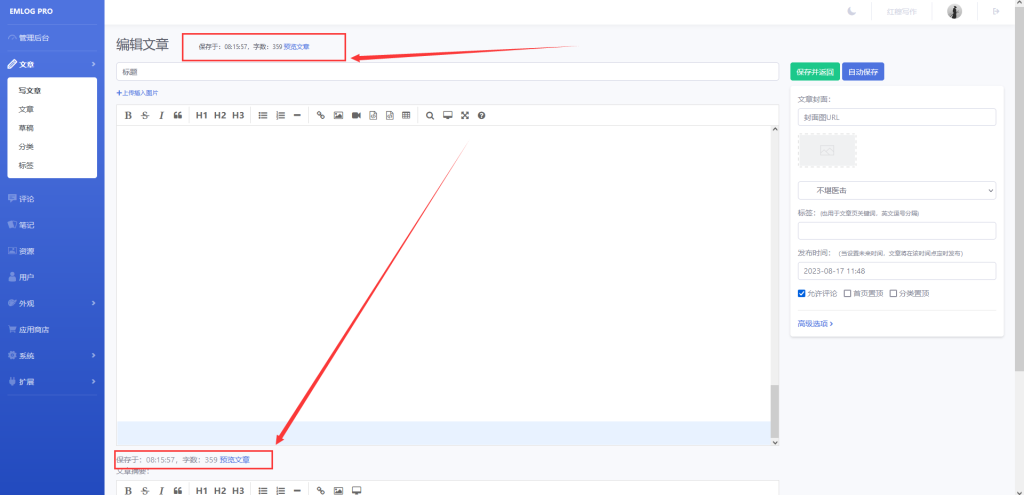
The specific modifications are as shown in the figure:
ad1a1b7183081645


Specific to how many seconds it was saved!

The number of words is displayed at the same time, which is very convenient for everyone to check their own articles!

Modify the tutorial:

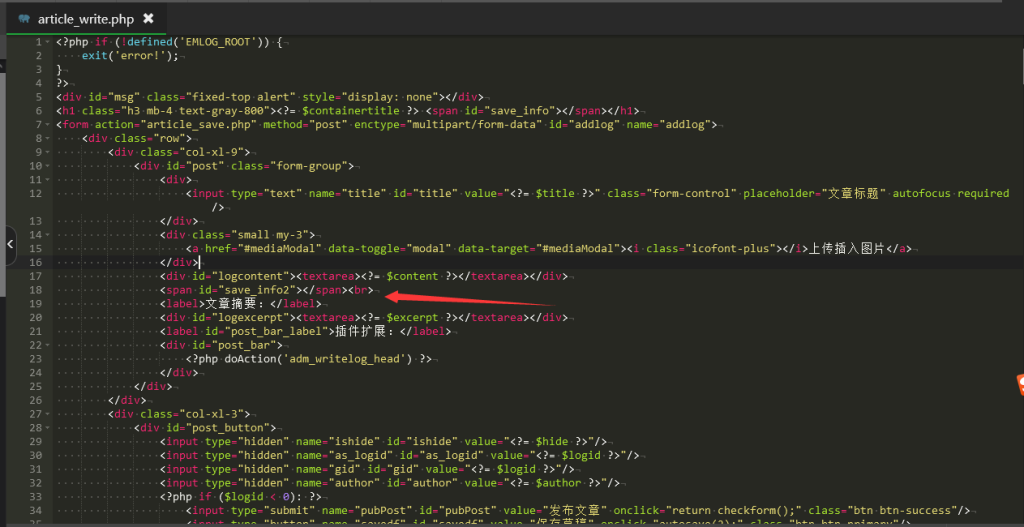
Open the file:/admin/views/article_write.php, find the code:

<label>文章摘要:</label>

About 18 lines!

Add a string of code above this code:

<span id="save_info2"></span><br>

The modified screenshot is:

ad1a1b7183081942

Second step modification

open the file,/admin/views/js/common.js, find the functionautosave

Replace the function with:

function autosave(act) {
    const nodeid = "as_logid";
    const timeout = 60000;
    const url = "article_save.php?action=autosave";
    const alias = $.trim($("#alias").val());
    const content = Editor.getMarkdown();
    let ishide = $.trim($("#ishide").val());
    if (ishide === "") {
        $("#ishide").val("y")
    }

    if (alias != '' && 0 != isalias(alias)) {
        $("#msg").show().html("链接别名错误,自动保存失败");
        if (act == 0) {
            setTimeout("autosave(1)", timeout);
        }
        return;
    }
    // 编辑发布状态的文章时不自动保存
    if (act == 1 && ishide == 'n') {
        return;
    }
    // 内容为空时不自动保存
    if (act == 1 && content == "") {
        setTimeout("autosave(1)", timeout);
        return;
    }
    // 距离上次保存成功时间小于一秒时不允许手动保存
    if ((new Date().getTime() - Cookies.get('em_saveLastTime')) < 1000 && act != 1) {
        alert("请勿频繁操作!");
        return;
    }
    const btname = $("#savedf").val();
    $("#savedf").val("正在保存中...");
    $('title').text('[保存中] ' + titleText);
    $("#savedf").attr("disabled", "disabled");
    $.post(url, $("#addlog").serialize(), function (data) {
        data = $.trim(data);
        var isresponse = /.*autosave\_gid\:\d+\_.*/;
        if (isresponse.test(data)) {
            const getvar = data.match(/_gid:([\d]+)_/);
            const logid = getvar[1];
            const d = new Date();
            const h = d.getHours();
            const m = d.getMinutes();
            const s = d.getSeconds();
            const tm = (h < 10 ? "0" + h : h) + ":" + (m < 10 ? "0" + m : m) + ":" + (s < 10 ? "0" + s : s); // 添加秒数
            const contentWithoutNewlines = content.replace(/\n/g, ""); // 移除换行符
            const wordCount = contentWithoutNewlines.length; // 统计文章字数
            $("#save_info").html("保存于:" + tm + ",字数:" + wordCount + " <a href=\"../?post=" + logid + "\" target=\"_blank\">预览文章</a>");
            $("#save_info2").html("保存于:" + tm + ",字数:" + wordCount + " <a href=\"../?post=" + logid + "\" target=\"_blank\">预览文章</a>");
            $('title').text('[保存成功] ' + titleText);
            articleTextRecord = $("#addlog textarea[name=logcontent]").val(); // 保存成功后,将原文本记录值替换为现在的文本
            Cookies.set('em_saveLastTime', new Date().getTime()); // 把保存成功时间戳记录(或更新)到 cookie 中
            $("#" + nodeid).val(logid);
            $("#savedf").attr("disabled", false).val(btname);
        } else {
            $("#savedf").attr("disabled", false).val(btname);
            $("#save_info").html("保存失败,可能文章不可编辑或达到每日发文限额").addClass("alert-danger");
            $('title').text('[保存失败] ' + titleText);
        }
    });
    if (act == 1) {
        setTimeout("autosave(1)", timeout);
    }
}

After replacement, save it!

微信赞赏

WeChat

支付宝赞赏

Alipay

✍️ Author: Hong Mu

webmaster · Thanks for reading, stay tuned for more exciting content

Author homepage View home page →

Related articles

Emlog enables automatic saving when editing articles.

Emlog enables automatic saving when editing articles. Program Notes emlog

The automatic save feature allows you to automatically save your edits when you publish an article – it doesn't generate any extra IDs or drafts! When you click the "Auto Save" button, the page will be automatically submitted and saved without interrupting your editing process! The advantage is that you can save your article at any time; if a power outage or network disruption occurs and your changes aren't saved, you might be in for a real headache! Let's get started with the tutorial! Step 1: Open /admin/views/artic...
👁 244
EMLOG backend editor – Set text size

EMLOG backend editor – Set text size Program Notes emlog

When editing text in EMLOG, the font size displayed is too small, making it very uncomfortable to read; if left unchanged, the text is practically impossible to read! To set the font size to 16px, you can modify the following code: Step 1: Open the `admin/views/article_write.php` file, and in the initialization section of both `Editor` and `Editor_summary`, locate the `path:` line...
👁 201
Change article line breaks in EMLog to <p> tags.

Change article line breaks in EMLog to <p> tags. Program Notes emlog

The new version of EMLOG is still unfamiliar to me – the editor still has a ton of issues! However, since I'm not very familiar with JavaScript, I've simply modified the line breaks using PHP! Find your article page template (e.g., `echo_log.php`) and modify the variable used for outputting your articles: `&lt;? $log_content = str_replace(&quot;&lt;br/&gt;", &quot;&lt;/p&amp;gt;...`
👁 191
EMLog Pro – Happy Crack Version – For learning, sharing, and use.

EMLog Pro – Happy Crack Version – For learning, sharing, and use. Program Notes emlog

This website uses the WordPress platform; emlog was only temporarily used for learning and sharing purposes. Recently, I remembered using the emlog software to write a blog before – it worked quite well – so on a whim, I downloaded and started using it! However, there's a so-called paid version available! So, I searched online and found a cracked version of the software. Driven by my desire to learn, I gave it a try – and the results are as follows: The performance is excellent! In fact, the emlog source code is open-source, and...
👁 1587
EMLOG Pro Registration Code "Cracking" Tutorial (What should users do if the official or free version of EMLOG suddenly becomes unavailable?)

EMLOG Pro Registration Code "Cracking" Tutorial (What should users do if the official or free version of EMLOG suddenly becomes unavailable?) Program Notes emlog

Preface: A tutorial on "cracking" the EMLOG Pro registration code – why use quotation marks for the word "cracking"? Because EMLOG is fully open-source software; anyone can download and modify it freely. Since it's open-source, the concept of "cracking" doesn't really apply. Main text: What should users do if the official EMLOG version or the free EMLOG version suddenly disappears? What if your EMLOG Pro cannot connect to the server...
👁 1264
How to make administrator login visible on Emlog?

How to make administrator login visible on Emlog? Program Notes emlog

I took a look at EMLOG, downloaded a template, but during use, I noticed that there was no login-protected functionality! What I needed was features accessible only to administrators upon logging in. So, I checked the official documentation: there are directly usable constant variables and constant type definitions. For example: - `Option::EMLOG_VERSION` – retrieves the current EMLOG version number; - `ROLE` – indicates the current user role (user group): `admin` (administrator), `writer`, etc.
👁 259

Recommended reading

(Adaptive mobile version) Download PBootCMS English-language foreign trade export website source code – 0225

(Adaptive mobile version) Download PBootCMS English-language foreign trade export website source code – 0225 Practical Collection pbootcms Template

This is a comprehensive, adaptive PbootCMS English-language e-commerce export website source code package for mobile devices. The design features an international, minimalist style, making it ideal for export-oriented businesses to create professional English-language official websites. It enables foreign trade companies to showcase their corporate image in global markets at low cost and high efficiency. Template Preview | Installation Instructions | Website Backend: /admin.php | Username: admin | Password: admin | Extraction Password: www.4s5.cn | Related Articles: Pb...
👁 40
Responsive Short-Video Live-Streaming E-commerce Marketing Single-Page Website Template – 1120

Responsive Short-Video Live-Streaming E-commerce Marketing Single-Page Website Template – 1120 Practical Collection Yiyou template

This EyouCMS responsive template is ideal for short-form videos, live-streaming e-commerce campaigns, and marketing landing pages. Its trendy design style is perfect for showcasing live-streaming e-commerce case studies, short-form video content, and marketing strategies. It helps MCN agencies or marketing firms attract brand partners online. Template Demo | Installation Instructions | Website Backend: /login.php | Username: admin | Password: admin | Related Articles: Summary of Common Installation Issues for EyouCMS | EyouCMS...
👁 56
What is the function of the ibtmp1 file, and what are the effects of deleting it?

What is the function of the ibtmp1 file, and what are the effects of deleting it? Summary of pitfalls

The ibtmp1 file is one of the temporary table space files of the InnoDB storage engine in MySQL. It is used to store temporary tables and sorted data created by the InnoDB storage engine. A temporary table is a table used to store result sets or intermediate results when performing temporary calculations or processing large amounts of data. Sort data is used to store intermediate results in sort operations and disk temporary files. If you accidentally delete ibtmp1 files,…
👁 395
Financial and taxation management consulting company website template 0414

Financial and taxation management consulting company website template 0414 Practical Collection Yiyou template

This set of eyoucms templates is suitable for financial and taxation management and consulting companies. The design style is professional and rigorous, and can display financial and taxation services, management consulting, successful cases and corporate strength. It helps financial and tax consulting companies display their brands online and attract corporate customers. Template display Installation instructions Website backend: /login.php Account: admin Password: admin Related articles Summary of common problems in the installation of Yiyou CMS Yiyou CMS (Ey...
👁 67
(Adaptive mobile version) English foreign trade website template Enterprise general electronic products foreign trade website source code download 0901

(Adaptive mobile version) English foreign trade website template Enterprise general electronic products foreign trade website source code download 0901 Practical Collection pbootcms Template

An English foreign trade and general electronic product foreign trade PbootCMS website template, supporting PC and WAP. The design style is international and simple, suitable for electronic product foreign trade companies to display their brands and products. It helps Chinese electronic product manufacturing companies display their image in the global market. Template display Installation instructions Website backend:/admin.php Account: admin Password: admin Unzip password: www.4s5.cn phase...
👁 48
(Adaptive Mobile Version) pbootCMS Marketing-Oriented Industrial Bearing Enterprise Website Template – Responsive Hardware and Machinery Enterprise Website Source Code Download: 0226

(Adaptive Mobile Version) pbootCMS Marketing-Oriented Industrial Bearing Enterprise Website Template – Responsive Hardware and Machinery Enterprise Website Source Code Download: 0226 Practical Collection pbootcms Template

An adaptive mobile terminal PbootCMS marketing mechanical bearings and hardware mechanical equipment enterprise website template. Design style of professional atmosphere, pay attention to product display and brand tone. It is helpful for machinery manufacturing enterprises to display their product series online and obtain accurate customer inquiries. Template display, installation instructions website background: / admin.php account: admin password: admin decompression password: www.4s5.cn related articles...
👁 35