Hongmu Notes
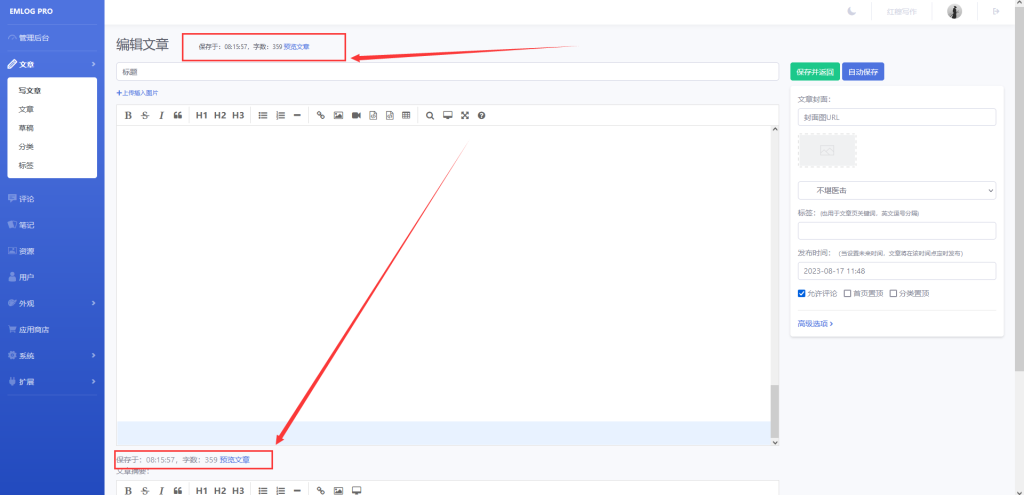
Home Program Notes Emlog enables automatic saving when editing articles.
Program Notes emlog

Emlog enables automatic saving when editing articles.

Emlog enables automatic saving when editing articles.

The automatic save feature refers to the automatic saving when editing previously published articles; it does not generate any extra IDs or drafts!

ad1a1b7183203516

When you click the Auto Save button, the page will be automatically submitted and saved – without affecting your edits!

The advantage is that you can save your article at any time; if there's a power outage, internet connection loss, or failure to save your work, losing it could really upset you!

Let's get started with the tutorial!

Step 1: Open/admin/views/article_write.phpdocument

Find the code:

<input type="button" name="savedf" id="savedf" value="保存" onclick="autosave(2);" class="btn btn-primary"/>

Modify it as follows:

<input type="button" name="savedf" id="savedf" value="自动保存" onclick="startAutosave()" class="btn btn-primary">
<script>
    var timerss; // 定时器

    function startAutosave() {
      // 点击按钮时立即进行一次保存
      autosave();
    
      // 设置定时器,每隔 15 秒钟自动保存一次
      timerss = setInterval(function() {
        autosave();
      }, 15000);
    }
</script>

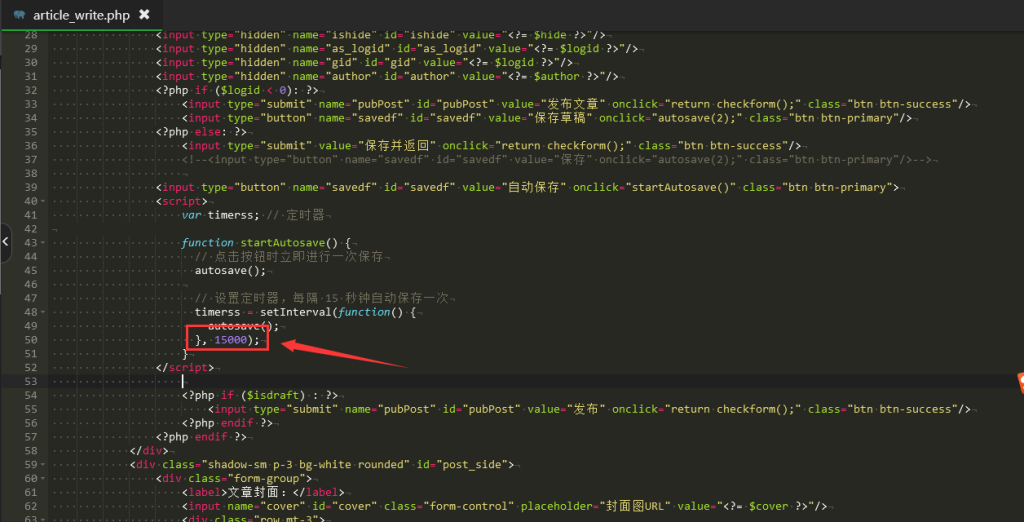
Step 2: Adjust the time for automatic scheduled saving.
ad1a1b7183203853

The unit is milliseconds!

1500 means 15 seconds!

You can customize it according to your preferences!

Once done, simply save!

微信赞赏

WeChat

支付宝赞赏

Alipay

✍️ Author: Hong Mu

webmaster · Thanks for reading, stay tuned for more exciting content

Author homepage View home page →

Related articles

EMLOG backend editor – Set text size

EMLOG backend editor – Set text size Program Notes emlog

When editing text in EMLOG, the font size displayed is too small, making it very uncomfortable to read; if left unchanged, the text is practically impossible to read! To set the font size to 16px, you can modify the following code: Step 1: Open the `admin/views/article_write.php` file, and in the initialization section of both `Editor` and `Editor_summary`, locate the `path:` line...
👁 201
Change article line breaks in EMLog to <p> tags.

Change article line breaks in EMLog to <p> tags. Program Notes emlog

The new version of EMLOG is still unfamiliar to me – the editor still has a ton of issues! However, since I'm not very familiar with JavaScript, I've simply modified the line breaks using PHP! Find your article page template (e.g., `echo_log.php`) and modify the variable used for outputting your articles: `&lt;? $log_content = str_replace(&quot;&lt;br/&gt;", &quot;&lt;/p&amp;gt;...`
👁 191
When editing articles in the EMLOG backend, automatic saving and display of word count statistics are enabled.

When editing articles in the EMLOG backend, automatic saving and display of word count statistics are enabled. Program Notes emlog

The specific modifications are shown in the figure below: This shows exactly how many seconds have been saved! It also displays the number of words in the article, making it very convenient for users to review their own content! Modification tutorial: Open the file `/admin/views/article_write.php`, and locate the code snippet: `<label>Article Summary:</label><%/label>` – this is approximately 18 lines of code. Add the following code snippet above this section: `<span i...`
👁 260
EMLog Pro – Happy Crack Version – For learning, sharing, and use.

EMLog Pro – Happy Crack Version – For learning, sharing, and use. Program Notes emlog

This website uses the WordPress platform; emlog was only temporarily used for learning and sharing purposes. Recently, I remembered using the emlog software to write a blog before – it worked quite well – so on a whim, I downloaded and started using it! However, there's a so-called paid version available! So, I searched online and found a cracked version of the software. Driven by my desire to learn, I gave it a try – and the results are as follows: The performance is excellent! In fact, the emlog source code is open-source, and...
👁 1587
EMLOG Pro Registration Code "Cracking" Tutorial (What should users do if the official or free version of EMLOG suddenly becomes unavailable?)

EMLOG Pro Registration Code "Cracking" Tutorial (What should users do if the official or free version of EMLOG suddenly becomes unavailable?) Program Notes emlog

Preface: A tutorial on "cracking" the EMLOG Pro registration code – why use quotation marks for the word "cracking"? Because EMLOG is fully open-source software; anyone can download and modify it freely. Since it's open-source, the concept of "cracking" doesn't really apply. Main text: What should users do if the official EMLOG version or the free EMLOG version suddenly disappears? What if your EMLOG Pro cannot connect to the server...
👁 1264
How to make administrator login visible on Emlog?

How to make administrator login visible on Emlog? Program Notes emlog

I took a look at EMLOG, downloaded a template, but during use, I noticed that there was no login-protected functionality! What I needed was features accessible only to administrators upon logging in. So, I checked the official documentation: there are directly usable constant variables and constant type definitions. For example: - `Option::EMLOG_VERSION` – retrieves the current EMLOG version number; - `ROLE` – indicates the current user role (user group): `admin` (administrator), `writer`, etc.
👁 259

Recommended reading

The difference between single quotes '' and double quotes "" in PHP tags

The difference between single quotes '' and double quotes "" in PHP tags Language Notes PHP

In PHP, both single quotes (') and double quotes (") can be used to represent strings. Although these two symbols are used interchangeably in some situations, they are also quite distinct in some respects. Single quotes (') are used to create simple strings, and anything contained within them has no special meaning, meaning backslashes and variables are not interpreted as special characters. For example: $message = 'Hello, World…
👁 142
(PC + WAP) Lighting Technology Website Template – Download LED Lighting Website Source Code – 0913

(PC + WAP) Lighting Technology Website Template – Download LED Lighting Website Source Code – 0913 Practical Collection pbootcms Template

A PbootCMS website template combining lighting technology with LED lighting solutions, compatible with both PC and WAP devices. Featuring a modern, energy-efficient design ideal for showcasing lighting products, project cases, and technical advantages. This template helps lighting companies present their brands online and attract both project-based and international clients. Template Preview | Installation Instructions | Website Backend: /admin.php | Username: admin | Password: admin | Extraction Password: www.4s5.cn...
👁 41
Government Association Website Template 1141

Government Association Website Template 1141 Practical Collection Yiyou template

An eYouCMS website template designed specifically for government agencies and industry associations. Its sophisticated and professional design is ideal for showcasing government transparency initiatives, association functions, industry trends, and member services. This template helps government bodies and industry associations establish an official online information publishing platform. Template Overview | Installation Instructions | Website Backend: /login.php | Username: admin | Password: admin | Related Articles: Summary of Common Installation Issues for eYouCMS | eYouCMS...
👁 38
(Adaptive mobile version) English livestock farming website – PBootCMS template; Download horse breeding and farm website template – 0235

(Adaptive mobile version) English livestock farming website – PBootCMS template; Download horse breeding and farm website template – 0235 Practical Collection pbootcms Template

This is an adaptive mobile-friendly PbootCMS website template designed for equestrian farms and livestock farming businesses. Its natural and professional design makes it ideal for showcasing breeding environments and horse breeds, aiding livestock enterprises in brand promotion and product presentation in international markets. Template Preview | Installation Instructions | Website Backend: /admin.php | Username: admin | Password: admin | Extraction Password: www.4s5.cn | Related Articles...
👁 37
Squeegee Machine & Hot Melt Machine Website Template 0430

Squeegee Machine & Hot Melt Machine Website Template 0430 Practical Collection Yiyou template

This EyouCMS template is designed for the dispensing machine and hot-melt machine industries, featuring a professional industrial design style ideal for showcasing dispensing machine products, hot-melt machine equipment, technical specifications, and industrial applications. It enables machinery and equipment manufacturers to showcase their products online and attract electronics and industrial customers. Template Display | Installation Instructions | Website Backend: /login.php | Username: admin | Password: admin | Related Articles: Summary of Common Installation Issues for EyouCMS | EyouCMS...
👁 62
WordPress error: Warning: mysqli_query(): (HY000/1030): Received error 28 from the storage engine in /wp-includes/class-wpdb.php, line 2187

WordPress error: Warning: mysqli_query(): (HY000/1030): Received error 28 from the storage engine in /wp-includes/class-wpdb.php, line 2187 Language Notes PHP

This error message indicates that there is a problem with the database—typically, the disk space is full, preventing the database from being written to. You should check the disk space usage on the disk where the database is located. You can do this by opening the Control Panel or running the `df –h` command to view the disk space usage and ensure that there is sufficient available space. Otherwise, you need to either increase the available disk space or clean up the database.
👁 136