Hongmu Notes
Home Summary of pitfalls

Summary of pitfalls

A summary of common mistakes encountered when building websites... This list isn't exhaustive; it merely records the issues I faced during my own development projects.

How to tell whether your computer is 32-bit or 64-bit?

How to tell whether your computer is 32-bit or 64-bit? Summary of pitfalls Hobbies Memo notes

For Windows systems, check Win10/Win11 through settings: Open Settings > System > About > View the system type in "Device Specifications", it will indicate "64-bit operating system" or "32-bit operating system". Win7/Win8: Right-click Computer (or "This PC") > Properties, view in "System Type". Press Win… via Command Prompt

👁 110
What should I do if the output file name displayed in Windows shows garbled characters?

What should I do if the output file name displayed in Windows shows garbled characters? Summary of pitfalls

My code: $filesss = glob('./pic/*.jpg'); print_r($filesss); When running this code on a Windows environment, the output file name appears as garbled text. The reason for this issue is that PHP on Windows defaults to using the system's native encoding when processing file names, which can cause file names containing Chinese characters or other non-ASCII characters to be displayed as garbled text during output. Solution...
👁 216
PHP+HTML+bootstrap simple page verification, beautiful

PHP+HTML+bootstrap simple page verification, beautiful Language Notes PHP Summary of pitfalls

Rendering, enter the password to access the original page. Super simple, super usable code! Code: // Verify password logic $correct_password = 'www.4s5.cn'; // Set the correct password $is_authenticated = false; if (isset($_POST['password'])) { i…
👁 273
How to convert SRT subtitles to WebVTT subtitle format?

How to convert SRT subtitles to WebVTT subtitle format? Summary of pitfalls

Very simple! The first step is to open the srt subtitle file first! Add the WEBVTT logo to the first line of the subtitle file! WEBVTT 1 00:00:04,400 --> 00:00:06,000 Subtitle text 1 2 00:00:20,133 --> 00:00:23,800 Subtitle text 2 Step two! Change the English commas [,] in the subtitles to English periods […
👁 287
Uncaught TypeError: document.currentScript is null

Uncaught TypeError: document.currentScript is null Summary of pitfalls

If document.currentScript returns null, this usually means that the JavaScript file was not introduced directly through the <script> tag, but was loaded through other means, such as using a module loader (such as RequireJS) or dynamically creating the <script&gt…
👁 225
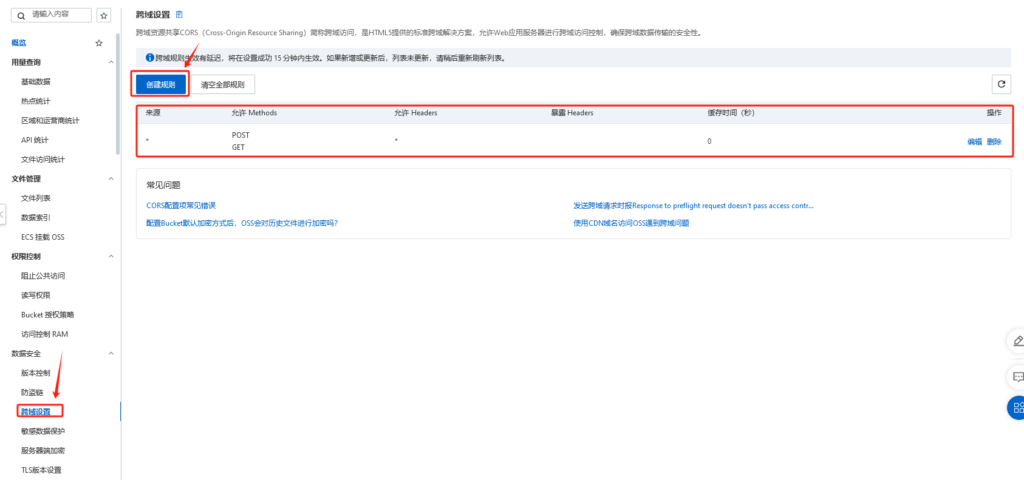
How to configure cross-origin settings for Alibaba Cloud OSS buckets?

How to configure cross-origin settings for Alibaba Cloud OSS buckets? Summary of pitfalls

When using a certain network disk system, I found that I could not upload files! Uploading files directly doesn’t work either! After investigation, it turned out to be a cross-domain setting issue! So I simply set it up and the problem was eliminated!
👁 162
How to get the LRC lyrics of songs from QQ Music? Get the web version online!

How to get the LRC lyrics of songs from QQ Music? Get the web version online! Summary of pitfalls

For some reasons, I need to obtain the LRC lyrics of QQ Music! But there are no ready-made tools! So I can only get it manually with F12! [Tutorial address: www.4s5.cn] The specific steps are as follows! After this step is obtained! The obtained lyrics are Base64 encrypted! As follows: W3RpOueJoeS4ueaxn10KW2FyOui/quWonCzmspnkuIDmsYBFTCx…
👁 584
How to link multiple columns within the same row in Excel?

How to link multiple columns within the same row in Excel? Summary of pitfalls

I happened to need this combination when filtering website columns, so I did some research. Specifically, in Excel, you can use the CONCATENATE function or the & operator to link multiple columns together in the same row. Method 1: Use the CONCATENATE function Suppose you want to link columns A1, B1 and C1 together. You can enter the following formula in cell D1: =CONCATE…
👁 305
A simple yet powerful HTML code snippet – iFearMe Framework

A simple yet powerful HTML code snippet – iFearMe Framework Summary of pitfalls Practical Collection Utility tools

Since I prefer automation when building websites, many tasks require multiple visits to a single URL to process content stored on the server. In such cases, for various reasons, it may not be possible to simply refresh the page directly; this is where the iFearMe framework comes in handy! The iFearMe framework code: <!DOCTYPE html> <html> <head> <title...
👁 212
How can the data table rearrange the primary key from 1 without affecting other contents?

How can the data table rearrange the primary key from 1 without affecting other contents? Language Notes mySql Summary of pitfalls

After studying all morning, I finally found a solution. One primary table and one secondary table, and want to rearrange the primary keys of two tables at one time. Originally said to rely on PHP to traverse processing, the result is outrageous, too slow, so directly on SQL code processing! SQL Code: Hidden Content: View after comments # Create Item _ Instance _ New Create Table Item _ Instance _ N …
👁 204
1 2 3 4 5 14