Hongmu Notes
Home Summary of pitfalls

Summary of pitfalls

A summary of common mistakes encountered when building websites... This list isn't exhaustive; it merely records the issues I faced during my own development projects.

How to locate and download website log files using the Baota Panel?

How to locate and download website log files using the Baota Panel? Summary of pitfalls

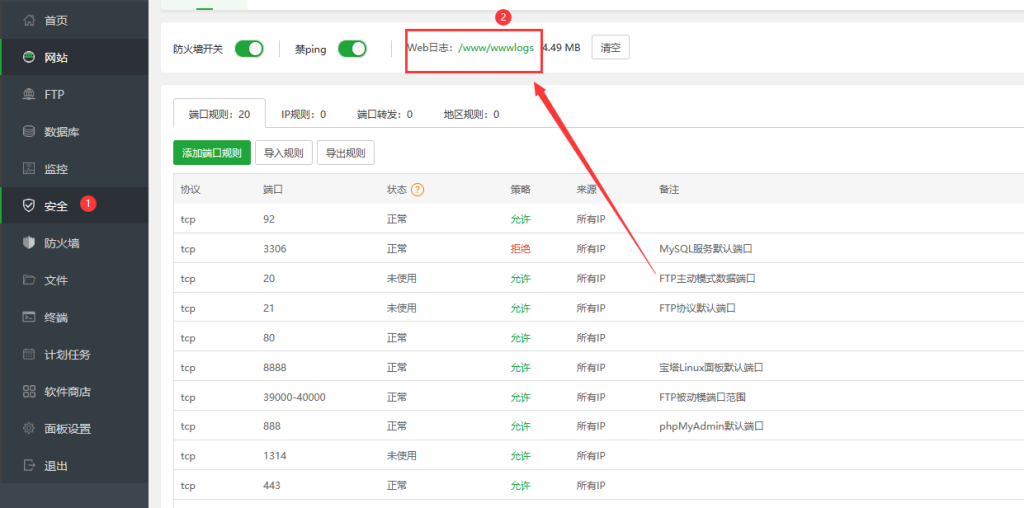
The BaoTa Panel is one of the most widely used and popular integrated website-building tools among webmasters during the website creation process. Its user-friendly, no-technical-guy interface enables even beginners to quickly set up a website. During the website deployment process, it is often necessary to analyze website logs – including, among others, the BaoTa Panel login logs, server error logs, Nginx error logs, and database logs. Below is a detailed guide on where to find these BaoTa website logs and how to manage them...

👁 1378
Do you have any good suggestions for developing an MVC framework in PHP?

Do you have any good suggestions for developing an MVC framework in PHP? Summary of pitfalls

Developing an MVC framework requires considering the following aspects: Design patterns: The MVC pattern is an important design pattern; however, other design patterns—such as the Factory Pattern and the Singleton Pattern—should also be taken into account. Routing system: Design a simple and user-friendly routing system that makes it easy for users to define routing rules and parameters. Database operations: Design an intuitive database operation class that supports multiple database types, such as MySQL, PostgreSQL, and so on.
👁 184
When the current site's images return a 404 error, Nginx automatically serves images from the backup site.

When the current site's images return a 404 error, Nginx automatically serves images from the backup site. Summary of pitfalls

You can use the following Nginx configuration to automatically fetch images from a backup site when a 404 error is returned for an image on this site: http { upstream backup_images { server backup.example.com; } server { listen 80; server_name example.com; r...
👁 120
After remotely downloading PHP from Linux to Windows and decompressing the zip, the Chinese name appears garbled, for example: 铓gui庺奇敼曛ㄥ堠炂€---瀹炵椤

After remotely downloading PHP from Linux to Windows and decompressing the zip, the Chinese name appears garbled, for example: 铓gui庺奇敼曛ㄥ堠炂€---瀹炵椤 Summary of pitfalls

This problem may be caused by different filename encodings. In Linux, UTF-8 encoding is usually used, while in Windows, GBK or UTF-16 encoding is usually used. You can try the following to resolve this issue: Convert the encoding of the downloaded file in the PHP script to UTF-8 so that the Chinese file name will be displayed correctly after decompression on Windows...
👁 199
When using the PHPStudy tool, you encounter the message "No input file specified." What should you do?

When using the PHPStudy tool, you encounter the message "No input file specified." What should you do? Summary of pitfalls

The "No input file specified" error is usually caused by PHP-FPM not finding the requested file. Here are some possible solutions: Check that the requested file path is correct. Make sure the file path in your code points correctly to the file you want to access. Check PHP-FPM configuration. You can open php-fpm.conf or www.c…
👁 176
The Linux server's hard drive is full, preventing the Baota Panel from opening – what should be done?

The Linux server's hard drive is full, preventing the Baota Panel from opening – what should be done? Summary of pitfalls

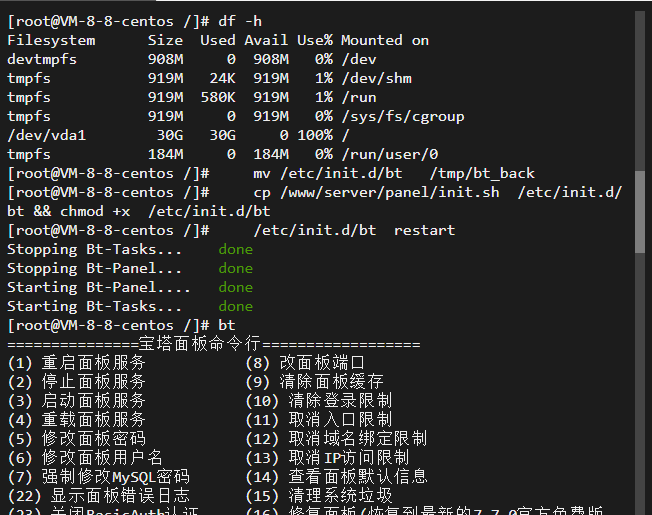
When the server's hard drive is full, it may cause the system to become unstable or fail to function properly. Insufficient disk space can also affect the normal operation of the Baota Panel. Here are several possible solutions: Clear disk space: Free up disk space by removing unnecessary files and log files, which may allow the Baota Panel to restart. You can log in to the server via SSH and run the `df-h` command to check disk usage. Then...
👁 238
After referencing a temporary file and then immediately deleting that referenced file, can the subsequent PHP code still be executed normally?

After referencing a temporary file and then immediately deleting that referenced file, can the subsequent PHP code still be executed normally? Summary of pitfalls

If you have decompressed the remotely downloaded compressed PHP file and included it using the `require_once` function, then immediately deleted the temporary file, you should be able to execute the PHP script normally. This is because PHP has already loaded the script code into memory and does not need to access the temporary file. However, please note that if you need to modify the referenced temporary file and save those changes during the execution of your script, then after the script has finished executing...
👁 138
Does the PHP temporary folder get deleted automatically?

Does the PHP temporary folder get deleted automatically? Summary of pitfalls

The `sys_get_temp_dir()` function in PHP returns the path to the system's temporary directory; on Unix/Linux systems, this is typically `/tmp`, while on Windows systems, it is `%TEMP%` or `%TMP%`. When you create a temporary file, it is usually saved in the system's temporary directory. The system's temporary directory is typically managed by the operating system or the web server; therefore, in certain cases, the system...
👁 159
Warning: require(): http:// wrapper is disabled in the server configuration by allow_url_include=0 in /www/wwwroot/test.4s5.cn/1.php on line 4

Warning: require(): http:// wrapper is disabled in the server configuration by allow_url_include=0 in /www/wwwroot/test.4s5.cn/1.php on line 4 Summary of pitfalls

This warning message indicates that the option to load files via HTTP:// URLs (allow_url_include) is disabled in the server's configuration file. This may prevent the `require()` and `include()` functions from loading remote files. To resolve this issue, you can try the following methods: use a local path to reference the file, download the remote file to your local server, and then...
👁 175
Is there any alternative to the ZipArchive class in PHP?

Is there any alternative to the ZipArchive class in PHP? Summary of pitfalls

In PHP, the ZipArchive class is a very convenient way to create, read, and extract ZIP files. If you want to use similar functionality but don't want to rely on the ZipArchive class, there are several alternative methods available, depending on your requirements. Here are some of the available alternatives: PclZip – PclZip is a PHP-based ZIP archiving library that allows you to easily create, read...
👁 238
1 8 9 10 11 12 14