The BaoTa Panel is one of the most widely used and popular integrated website-building tools among webmasters during the website creation process. Its user-friendly, no-technical-guy interface enables even beginners to quickly set up a website. During the website development process, it is often necessary to analyze website logs – including BaoTa Panel login logs, server error logs, Nginx error logs, and database logs, among others. Below is a detailed tutorial provided by the author on how to view BaoTa website logs and how to check these logs.
https://www.4s5.cn/archives/1185.html
What types of pagoda logs are available?
The article begins by mentioning various types of Baota logs; these can be categorized into Baota Panel logs and website logs. The website logs can further be divided into server error logs, Nginx error logs, database logs, and website access logs. Additionally, if a firewall is installed on your server, there will also be firewall logs. All these logs are files with the.log extension.
Where are the Baota website logs located?
How do you locate the Baota website logs? There are two ways to open the Baota website logs.
For the first method, open the File module in the left sidebar of the Baota Panel, then locate the `/www/wwwlogs` folder under the root directory; you will then see the logs contained within the Baota website logs.
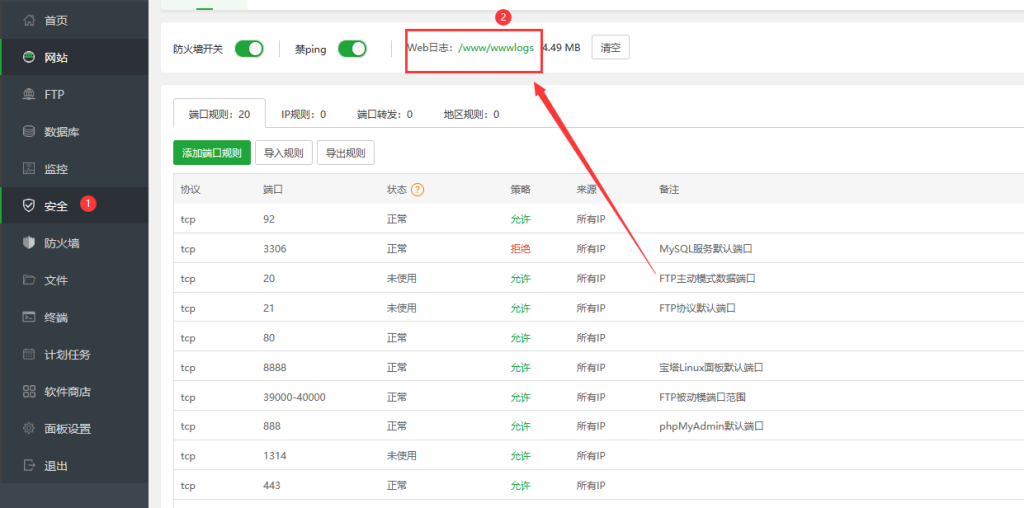
The second method: Open the Security Module in the left sidebar of the Pagoda Panel; under the System Firewall, next to the "Block Ping" option is the Website Logs section.
Where can I view the Baota Panel login logs?
Open the Security Module in the left sidebar of the BaoTa Panel; as shown in the figure above, the last module at the top is "Panel Logs," where you can view the accounts and IP addresses that recently logged into the BaoTa Panel, as well as all the operations performed within the panel.
How to open and view the Baota website access logs?
The BaoTa website access logs can be viewed directly within the BaoTa Panel; however, if the log size exceeds 3 MB, it cannot be opened directly within the BaoTa Panel. In such cases, the logs should be downloaded to your local machine and then viewed and analyzed using Notepad, a text editor, or a professional website log viewer tool.