Hongmu Notes
Home Program Notes Empire cms

Empire cms

Commonly used and practical Empire CMS codes – a collection of code snippets utilized in Empire CMS, such as those for creating and invoking navigation menus, implementing pagination, and performing various database queries, among others.

EmpireCMS – Random Article Thumbnail Generation and Article-Embedded Image Replacement

EmpireCMS – Random Article Thumbnail Generation and Article-Embedded Image Replacement Program Notes Empire cms

I collected hundreds of thousands of articles, only to discover that none of them had thumbnails—which looked downright ugly, absolutely terrible!! So, with just a few simple clicks, I wrote some code to generate random thumbnails and assign one to every article! Code 🔒 Hidden content: Available to members only <?php $biao = "phome_"; // Table prefix $fbiao = "news"; // Table name requ...

👁 332
EmpireCMS Filtering Function

EmpireCMS Filtering Function Program Notes Empire cms

The built-in variable filtering function in EmpireCMS is frequently used during secondary development or when creating templates; mastering this function means you won't need to write your own filtering method, which saves a significant amount of code. (1) Numerical variables can be processed using the (int) or intval functions; example: $page=(int)$.Get[' page ']; or $page=intval($.Get[' page']; (2) Variables containing decimals...
👁 217
Detailed step-by-step instructions for upgrading from EmpireCMS 7.2 to EmpireCMS 7.5!

Detailed step-by-step instructions for upgrading from EmpireCMS 7.2 to EmpireCMS 7.5! Program Notes Empire cms

Note: This upgrade procedure does not affect the data or templates from the original Version 7.2. During the upgrade process, I encountered SQL-related errors and issues where the second upgrade failed multiple times when using the official upgrade tool; therefore, I modified the official upgrade tool – specifically, by disabling the SQL error handling and removing the function responsible for the second upgrade – which allows the upgrade to proceed smoothly! Navigation: I. Pre-upgrade Backup Procedure; II. Upgrade Steps; III. Member Interface Upgrade Instructions...
👁 260
Imperial CMS prompts Table ‘XX.***_enewspubtemp_2’ doesn’t exist error solution

Imperial CMS prompts Table ‘XX.***_enewspubtemp_2’ doesn’t exist error solution Program Notes Empire cms

During the test installation of EmpireCMS, after the database restoration is completed, an error message may occasionally appear: "Table 'sjjdkn.***_enewspubtemp_2' does not exist; SELECT indextemp FROM ***_enewspubtemp_2 LIMIT 1." Let's first check the database (phome_enewspu...).
👁 361
Common SQL Code Summary for Empire CMS

Common SQL Code Summary for Empire CMS Program Notes Empire cms

This is where I store the SQL code I frequently use – for easy access in the future!! SQL code: For version 7.5 – TRUNCATE phome_enewsuser; TRUNCATE phome_enewslink; TRUNCATE phome_enewsuseradd; TRUNCATE phome_enewslog; INSERT...
👁 323
A quick way to add friendly links to EmpireCMS!

A quick way to add friendly links to EmpireCMS! Program Notes Empire cms

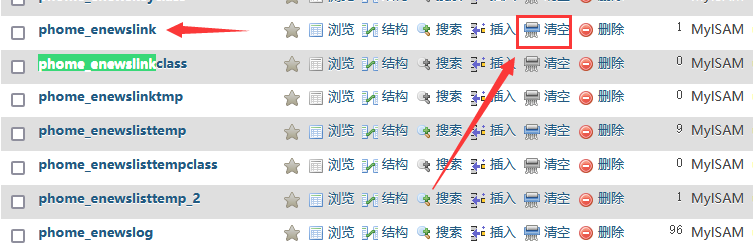
It's actually quite simple—in other words, it's just a database operation! Step 1: Open the database and locate the `phome_enewslink` data table. Step 2: Clear this table; however, if you wish to preserve the existing friendly links in this table, do not clear it. Step 3: Make appropriate modifications to the following SQL code—simply update the `link` and `name` fields! After making these changes, execute the SQL statement to batch-add the friendly links! `INSERT INTO `ph...`
👁 365
What to do if you forget your password for Empire CMS? A quick and efficient solution.

What to do if you forget your password for Empire CMS? A quick and efficient solution. Program Notes Empire cms

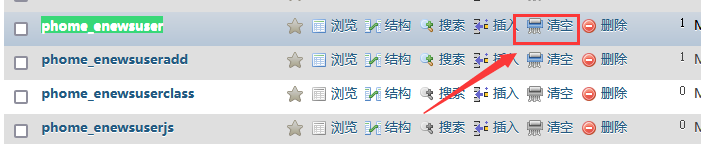
Since I am using the Baota Panel, let me use it as an example. Step 1: Log in to the database management panel and locate the EmpireCMS administrator table: `phome_enewsuser`. Step 2: Clear all data from this table. Step 3: Select this table and execute the following SQL statement: `INSERT INTO `phome_enewsuser` (`userid`, `username`, `p...`);`
👁 343
Imperial cms imitation website tutorial corresponding notes

Imperial cms imitation website tutorial corresponding notes Program Notes Empire cms

Hello everyone, welcome to learn the imperial cms imitation website tutorial. I am Hong Mu qq1810216796 QQ exchange group: 9589723231 Imperial cms website installation. Hello everyone, welcome to learn the imperial cms imitation website tutorial. I am Hong Mu qq: 1810216796 qq exchange group: 958972323 Build an imperial program. If you have a server and have built an imperial website on the server, then...
👁 3413
Empire paging query code

Empire paging query code Program Notes Empire cms

$file_page = &quot;juhe.txt&quot;; $num = 50; if(file_exists($file_page)){ $page_num = file_get_contents($file_page); }else{ $page_num = 0; } $page_i…
👁 232
Empire cms blog template backup

Empire cms blog template backup Program Notes Empire cms

I've prepared the template, and since I don't want to discard it – as I might need it in the future – I've decided to keep it safe! However, changing the template later on with Empire CMS could be quite troublesome, so I've simply shared the code directly. Much of this template consists of PHP code, so please don't download it; this is for personal backup purposes only. Link: https://pan.baidu.com/s/1caeeOl79tDCQDIczknRwZA?pwd=cm...
👁 232
1 2 3 4 5 6 10