As a free, open source, commercially available PHP enterprise website development and construction management system, PbootCMS is loved by the majority of webmasters for its ease of use and flexibility.. However, precisely because of its large number of users, it has also become a target of frequent scanning and attacks by hackers.. The following is a systematic security operation and maintenance plan, covering the complete process from basic reinforcement to emergency response.
I. Core Security Hardening
1.1 Keep the procedure up to date
This is the most important safety measure. PbootCMS has exposed multiple security vulnerabilities in history, including SQL injection (CVE-2025-46109, affecting versions 3.2.5~3.2.10), file upload bypass (CVE-2026-4509, affecting versions 3.2.12 and below), remote code execution, etc.. Officials will fix these vulnerabilities in the new version, so they must be updated in time.。
Operation suggestions:
Visit the PbootCMS official website regularly to check for version updates
Before updateBe sure to back up the entire site(File + Database)
If there is secondary development, please let technical personnel update it and never overwrite it directly.
Follow official security advisories for the latest threat intelligence
1.2 Modify the default backend path
The default background path is 域名/admin.php, which is the preferred attack entrance for hackers。
Operation steps:
admin.phpRename to a complex file name, such asmySecure2024Admin.phpUse later;
域名/新名称.phpLog in to the backendNoteDo not use;
admin、manager、guanliCommon vocabulary terms
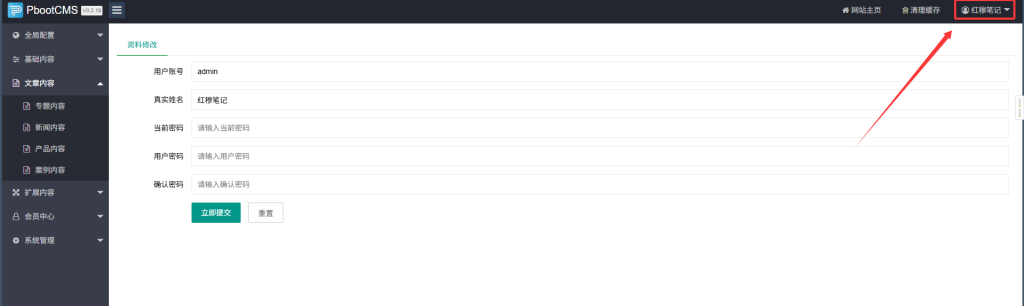
1.3 Strengthen Administrator Password
Default password; 123456 or ; admin 極ly dangerous; must be modified immediately.。
password strategy:
Length must be at least 12 characters
Must contain a combination of uppercase and lowercase letters, digits, and special characters.
Regular replacement (recommended every 3 months)
Enable background login verification code
Modify LocationLog in to the backend → Top right corner → Change account password
1.4 Enable Template Subdirectory
Operation PathBackend → [Global Configuration] → [Configuration Parameters] → [Security Configuration] → [Template Subdirectory]
When enabled, the system will prioritize loading template files from subdirectories, thereby preventing the direct exposure of the main template folder.。
1.5 Configure allowlist and denylist
In; 〖全局配置〗→〖配置参数〗→〖安全配置〗 Can be configured:
blacklistAdd IP addresses that should be restricted from accessing the site; when such an IP address attempts to access the site, it will be redirected to a 404 error page.
white listAllow only specific IP addresses to access the website; all other IP addresses should be redirected to a 404 error page.
1.6 Enable CAPTCHA
In; 〖全局配置〗→〖配置参数〗→〖安全设置〗 Enable:
Message Verification Code
Form CAPTCHA
Backend Verification Code
II. File System Protection
2.1 Directory Permission Settings (Very Important)
Permission settings serve as a critical safeguard against file tampering and malicious writing.Different directories should have different permission policies:
| Directory | Recommended Permissions | explain |
|---|---|---|
/apps | 555 (Write prohibited) | Core Program Directory – No writing allowed. |
/core | 555 (Write prohibited) | Core Framework Table of Contents |
/config | 755 (Read/Write) | Configuration file directory – must be readable. |
/data(SQLite Database Directory) | 755 (Read/Write) | The database file needs to be written to. |
/runtime | 755 (Read/Write) | The log and cache directories must be writable. |
/static | 755 (Read/Write) | Static Resources Directory |
/template | 555 (Write prohibited) | Template directory – Write access is prohibited. |
/uploads | 755 (Read/Write) | Upload directory – requires writing. |
General PrinciplesFirst, set all root directories to read-only mode (555 permission), then; runtime、data、static、uploads For directories that need to be written to, set their permissions individually to 755.。
2.2 Prohibiting the uploading of directories to execute PHP scripts
In; /uploads/ Create under Contents; .htaccess Use a document (Apache) or configure Nginx rules to prevent the execution of PHP scripts.:
Apache (.htaccess):
<Files *.php>
    Deny from all
</Files>Nginx:
location ~* ^/uploads/.*\.(php|php5|phtml)$ {
    deny all;
}
2.3 Remove unnecessary files
If the following files or directories are not essential, it is recommended to delete them.:
/doc(Document Table of Contents)/rewrite(Example of rewriting rule)/api.php(Not required for general corporate websites)
2.4 Configure Anti-Tampering Monitoring
Install File Verification PluginFor example, FileMonitor – monitors file changes.
Use server-grade anti-tampering measures:
Virtual Hosting: Enable the File Tamper Protection feature in the Control Panel
BaoTa Panel: Install "BaoTa Enterprise-grade Anti-Tampering – Reconstructed Edition"
Cloud Server: Install security software such as SecurityDog or CloudLock.
Guardian God • Intrusion Prevention System: Features built-in PbootCMS security templates, enabling one-click configuration for tamper-proof protection.
III. Database Security
3.1 Modify the SQLite database directory name (Required for SQLite users)
PbootCMS uses SQLite database by default; the database file is stored in /data/ Under the directory: Hackers often attempt to download this file directly to extract all the data.。
Operation steps:
support
/dataRename the folder to a complex name, e.g.data#2024_secureopen
/config/database.php,supportdbnameUpdate the path in the configuration to a new name.NoteIf you are using MySQL, this step does not apply.
3.2 Modify the default data table prefix
The default table prefix is ; ay_It is recommended to change this to a random prefix (e.g., ); xq38_)You can perform batch renaming using a database management tool, or directly modify the installation configuration during the initial setup.
3.3 Enable SQL Injection Protection
In; /config/database.php Enable parameter filtering:
'params_filter' => true, // 过滤特殊字符3.4 Regular database backup
Daily automatic backupThrough the Pagoda Panel, cPanel, or server scheduled tasks settings
Manual BackupLog in to the backend → Backup Database → Download and Save
Cloud SnapshotUse the server vendor's disk snapshot feature.
NoteBackup files should be regularly downloaded to local storage or cloud drives; do not rely solely on the backup stored on the host machine (which typically retains only the most recent three days' data).
IV. Server Environment Hardening
4.1 Dis禁用 PHP dangerous functions
In; php.ini Prohibit the use of high-risk functions:
disable_functions = exec,passthru,shell_exec,system,popen,proc_open,curl_exec,curl_multi_exec,parse_ini_file,show_source4.2 Configure open_basedir
Restrict the range of directories accessible to PHP:
open_basedir = /网站根目录:/tmp4.3 Install WAF Firewall
ApacheInstall ModSecurity
NginxInstall Naxsi or use the Baota Nginx Firewall.
Guardian God · Intrusion Prevention SystemBuilt-in SQL injection and XSS protection modules
4.4 Block suspicious IPs
Block malicious IP ranges in Nginx or Apache:
location ~* \.(php|asp)$ {
    deny 123.456.789.0/24;  # 封禁可疑IP段
}
4.5 Enable HTTPS
Configure an SSL certificate for your website and enable HTTPS.
In the PbootCMS backend;
〖全局配置〗→〖配置参数〗→〖安全配置〗Enable forced HTTPS
5. Robots.txt defense
In the website's root directory; robots.txt Prohibiting search engines from indexing sensitive directories can reduce the risk of being scanned.:
User-agent: *
Disallow: /admin/*
Disallow: /skin/
Disallow: /template/
Disallow: /static/*
Disallow: /api/*
Disallow: /?*
Disallow: /app*/
Disallow: /appNoteThis is merely a "defense" measure and cannot replace genuine access control.。
6. Turn off unnecessary functions
Message FunctionIf the website is not required, ;
〖全局配置〗→〖配置参数〗→〖安全设置〗Disable the message leave functionForm functionalityAs above: Close unnecessary forms.
7. Common vulnerability types and prevention
| Vulnerability Type | Risk Description | countermeasure |
|---|---|---|
| Weak backend password | Using a default or simple password makes it vulnerable to brute-force attacks. | Strong password policy + CAPTCHA + Login failure lockout |
| SQLpour into | Obtain sensitive data by constructing malicious parameters | Update to the latest version + Enable parameter filtering |
| Document upload vulnerability | Upload a WebShell to control the server | Restrict allowed file types + prohibit uploading to directories that execute PHP |
| XSS (Cross-Site Scripting) | Injecting malicious scripts to steal information | Update to the latest version + Input/Output Filtering |
| Path traversal | Unauthorized access to system files | Update to the latest version + Permissions Settings |
| SSRF | Use a server to initiate an internal request | Update to the latest version |
8. Emergency response: handling process after being hacked
If you discover that your website has been hacked, follow the steps below to address the issue.:
Disconnect from the internet immediatelySuspend website access to prevent further damage.
Scan backdoor filesCheck for any abnormal PHP files (especially );
/uploads/Table of Contents)Determine the type of tampering:
Mount Horse → Remove Abnormal Code
Go to → Check ;
.htaccess;index.php
Reset all passwordsBackend password, Server password, Database password
Restore from backupUse the most recent clean backup to restore the website.
Submit a broken linkSubmit broken links to search engines to avoid SEO penalties.
Identify the root cause of vulnerabilitiesAnalyze attack vectors and patch vulnerabilities
Recommended Monitoring Tools:
Document Monitoring: Tripwire
Vulnerability Scanning: WPScan
Traffic Analysis: GoAccess
9. Daily maintenance list
It is recommended to conduct a security audit once per month.:
- Check if there is a new version of PbootCMS.
- Check whether the PHP version on the server is up to date.
- Check whether the administrator password is sufficiently complex.
- check up
/uploads/Does the table of contents contain any abnormal files? - Check the website logs for any abnormal access attempts.
- Verify whether the database backup is functioning correctly.
- Check whether directory permissions have been modified.
- View the PbootCMS official security advisory
10. Summary
The core principle of PbootCMS security protection is ; "Depth Defense" No single measure can guarantee 100% security; however, implementing multiple layers of protection can significantly reduce the risk of an attack.。
The three most critical tasks:
Stay up to date – Timely update the software to patch known vulnerabilities
Minimize permissions Strictly control directory permissions; prevent writing to directories that should not be written to.
Regular backup Ensure rapid recovery even in the event of a security breach.
Security is a continuous process, not a one-time task. Maintaining vigilance and conducting regular checks are essential for ensuring the long-term security and stability of a website.
11. Webmaster Services
If you encounter any issues while using the source code of this website, for example:
-The website is not functioning properly, with pages displaying incorrectly or remaining blank
-Functional anomalies, database errors
-Need to modify certain code or adjust styling
-Custom development of new features required
-Server environment configuration and security hardening
-Website migration & data migration
-SEO optimization, performance optimization
Please feel free to contact us – we will provide you with professional and efficient technical support!
We offer the following services:
-Website Development and Customization
-Server operations and maintenance, security protection
-PHP/Python development, data collection
-Website outage resolution and Trojan horse removal
-SEO optimization, GEO optimization, Sitemap generation
-Pagoda Panel Operations and Maintenance, etc.
contact way:
QQ:1810216796