Hongmu Notes
Home Program Notes

Program Notes

In the final analysis, programmers taking notes is an efficient behavior of recording work experience. It can not only record the various technical problems encountered in the process of program development, but also record the beneficial experiences gained in learning technical knowledge. It can both help...

WordPress connects to a database to execute SQL queries and perform database operations.

WordPress connects to a database to execute SQL queries and perform database operations. Program Notes wordpress

If you need to perform a query in WordPress, you can use the `select()` method of the `$wpdb` object. Here is an example: `<?php // Import the WordPress core file: require_once(dirname(__FILE__). '/wp-load.php'); // Execute a query: glob...`

👁 251
WordPress connects to a database to execute SQL update operations.

WordPress connects to a database to execute SQL update operations. Program Notes wordpress

To execute an SQL update statement in WordPress, you first need to create a new PHP file and include the WordPress core files; this will include the database connection and the definition of the $wpdb object. Here is an example: <?php // Include the WordPress core files require_once(dirname(__FILE__));
👁 195
WordPress MySQL Database Table and Subtable Structure Functionality Guide

WordPress MySQL Database Table and Subtable Structure Functionality Guide Program Notes wordpress

WordPress uses a MySQL database. Its data table structure differs slightly from that of conventional databases; data can be stored either in the form of standard data tables or as data elements – the latter approach is less intuitive when viewed directly. To become a developer, you must understand the basic structure of the WordPress database and be able to use it within your own plugins or themes to write to or read from the database. I. Data Tables – As of WordPress...
👁 377
WordPress database query operations

WordPress database query operations Program Notes wordpress

To connect to a database for a WordPress installation, you need to include the `wp-config.php` file in your PHP script. This file contains the database configuration details for WordPress installation and other constants. Here is a simple example demonstrating how to include the `wp-config.php` file and establish a database connection: // Include the wp-config.php file: require...
👁 380
EmpireCMS – Random Article Thumbnail Generation and Article-Embedded Image Replacement

EmpireCMS – Random Article Thumbnail Generation and Article-Embedded Image Replacement Program Notes Empire cms

I collected hundreds of thousands of articles, only to discover that none of them had thumbnails—which looked downright ugly, absolutely terrible!! So, with just a few simple clicks, I wrote some code to generate random thumbnails and assign one to every article! Code 🔒 Hidden content: Available to members only <?php $biao = "phome_"; // Table prefix $fbiao = "news"; // Table name requ...
👁 334
EmpireCMS Filtering Function

EmpireCMS Filtering Function Program Notes Empire cms

The built-in variable filtering function in EmpireCMS is frequently used during secondary development or when creating templates; mastering this function means you won't need to write your own filtering method, which saves a significant amount of code. (1) Numerical variables can be processed using the (int) or intval functions; example: $page=(int)$.Get[' page ']; or $page=intval($.Get[' page']; (2) Variables containing decimals...
👁 217
Detailed step-by-step instructions for upgrading from EmpireCMS 7.2 to EmpireCMS 7.5!

Detailed step-by-step instructions for upgrading from EmpireCMS 7.2 to EmpireCMS 7.5! Program Notes Empire cms

Note: This upgrade procedure does not affect the data or templates from the original Version 7.2. During the upgrade process, I encountered SQL-related errors and issues where the second upgrade failed multiple times when using the official upgrade tool; therefore, I modified the official upgrade tool – specifically, by disabling the SQL error handling and removing the function responsible for the second upgrade – which allows the upgrade to proceed smoothly! Navigation: I. Pre-upgrade Backup Procedure; II. Upgrade Steps; III. Member Interface Upgrade Instructions...
👁 260
Imperial CMS prompts Table ‘XX.***_enewspubtemp_2’ doesn’t exist error solution

Imperial CMS prompts Table ‘XX.***_enewspubtemp_2’ doesn’t exist error solution Program Notes Empire cms

During the test installation of EmpireCMS, after the database restoration is completed, an error message may occasionally appear: "Table 'sjjdkn.***_enewspubtemp_2' does not exist; SELECT indextemp FROM ***_enewspubtemp_2 LIMIT 1." Let's first check the database (phome_enewspu...).
👁 361
Common SQL Code Summary for Empire CMS

Common SQL Code Summary for Empire CMS Program Notes Empire cms

This is where I store the SQL code I frequently use – for easy access in the future!! SQL code: For version 7.5 – TRUNCATE phome_enewsuser; TRUNCATE phome_enewslink; TRUNCATE phome_enewsuseradd; TRUNCATE phome_enewslog; INSERT...
👁 324
A quick way to add friendly links to EmpireCMS!

A quick way to add friendly links to EmpireCMS! Program Notes Empire cms

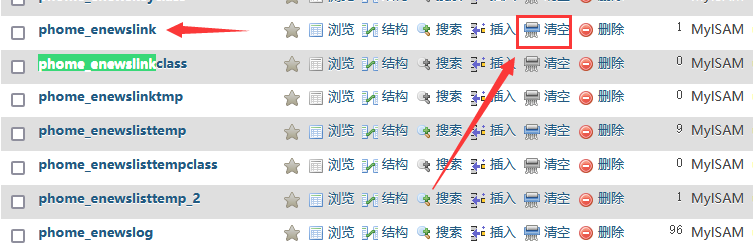
It's actually quite simple—in other words, it's just a database operation! Step 1: Open the database and locate the `phome_enewslink` data table. Step 2: Clear this table; however, if you wish to preserve the existing friendly links in this table, do not clear it. Step 3: Make appropriate modifications to the following SQL code—simply update the `link` and `name` fields! After making these changes, execute the SQL statement to batch-add the friendly links! `INSERT INTO `ph...`
👁 365
1 7 8 9 10 11 23