Hongmu Notes
Home Program Notes Empire CMS modifies PHP and directly sets the article calling conditions that are less than the article publishing time (newstime)
Program Notes Empire cms

Empire CMS modifies PHP and directly sets the article calling conditions that are less than the article publishing time (newstime)

Empire CMS modifies PHP and directly sets the article calling conditions that are less than the article publishing time (newstime)

Continue from the previous article!

In Empire CMS' Dynamic Mode, thousands of articles can be scheduled for automated publishing without any manual intervention.》!

This article enables your website to store tens of millions of articles without requiring you to manually review and publish them every day!

However, you need to modify the template invocation to set it as follows:newstime <= '.time().'

After some thought, I realized that certain websites are experiencing excessive API calls; manually modifying each call tag would be absolutely exhausting!

Therefore, we can directly embed this condition into the Empire PHP code, which eliminates the need to write this SQL statement every time the function is called!

Let's get started!

Step 1: Find/e/class/t_functions.php

Since the Dynamic Tag and Universal Tag are the most commonly used, simply modify the code corresponding to these two tags!

Universal Label Modification

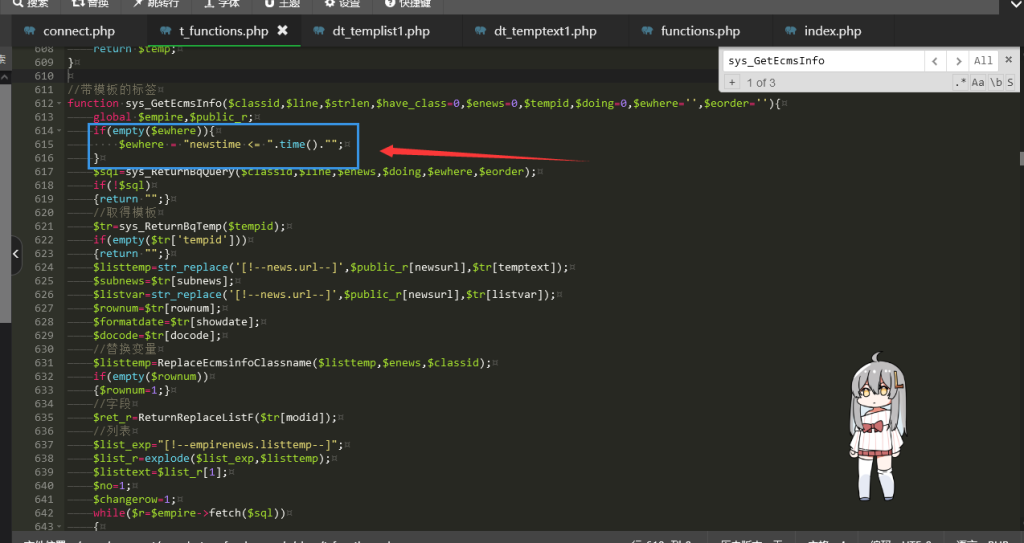
search:sys_GetEcmsInfo

The function is located around line 612; we have:

 隐藏内容:评论后查看
function sys_GetEcmsInfo($classid,$line,$strlen,$have_class=0,$enews=0,$tempid,$doing=0,$ewhere='',$eorder=''){
	global $empire,$public_r;

Add the following:

 隐藏内容:评论后查看
if(empty($ewhere)){
	$ewhere = "newstime <= ".time()."";
}

as shown in the figure:

ad1a1b7183230342

And that's it – the universal tag modification is complete!

Dynamic Tag Modification

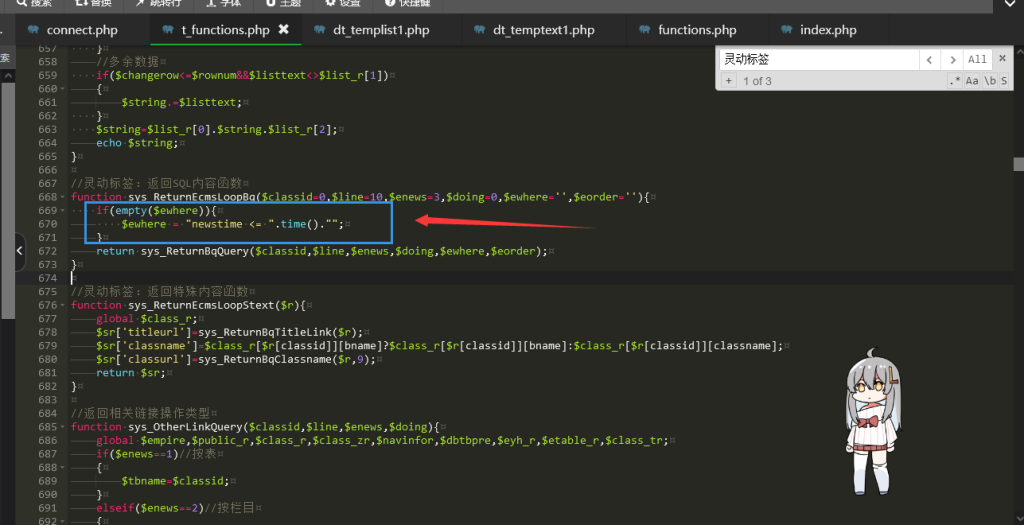
Search next灵动标签

Approximately 669 lines; modifications are shown in the figure:
ad1a1b7183230507

After this modification, the invocation of the Lingdong Tag now defaults to including the newstime check!

After making these changes, as long as your website uses either the Dynamic Tag or the Universal Tag, you can schedule regular content publishing!

List page modification

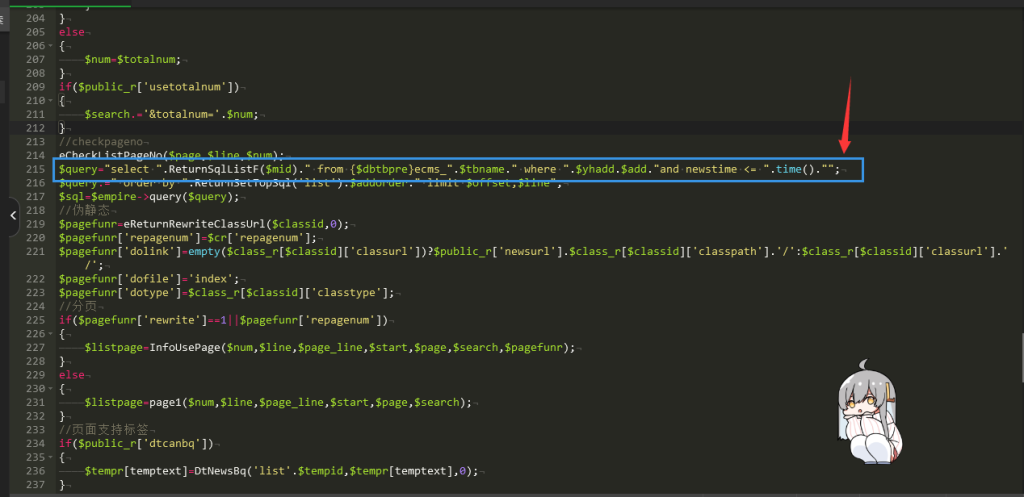
The modification of the list page differs from the previous case; since it is dynamic, the file we need to locate is:/e/action/InfoType/index.php

Open and then search:$query="select ".ReturnSqlListF($mid)." from {$dbtbpre}ecms_".$tbname." where ".$yhadd.$add

Approximately 215 lines!

be revised as:

 隐藏内容:评论后查看
$query="select ".ReturnSqlListF($mid)." from {$dbtbpre}ecms_".$tbname." where ".$yhadd.$add."and newstime <= ".time()."";

The modified code is shown in the figure:
 隐藏内容:评论后查看

ad1a1b7183231018

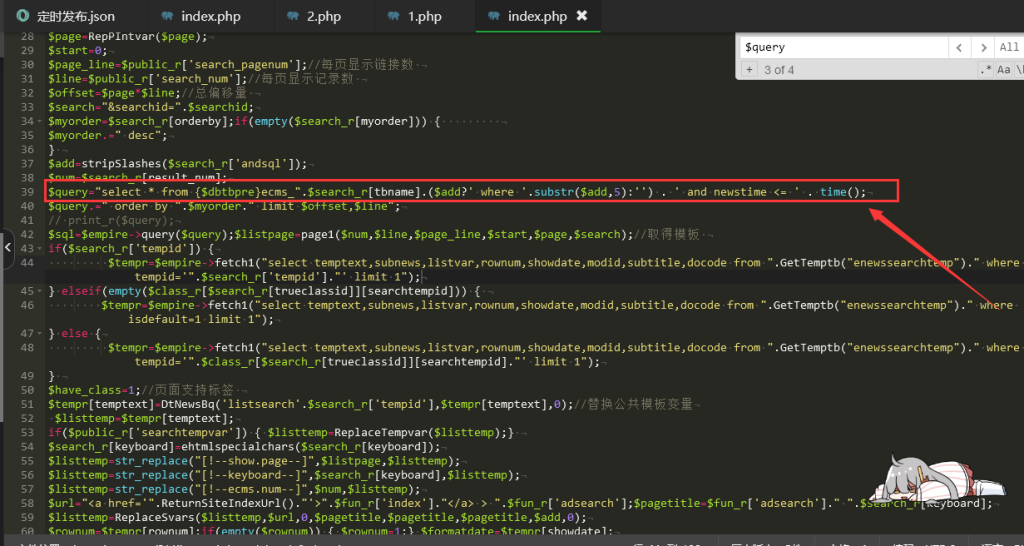
Search List Modification

finde/search/result/index.phpFind the code variable$queryThis is a variable in an SQL statement; locate it and add the following code:
 隐藏内容:评论后查看
. ' and newstime <= ' . time()

ad1a1b7183093036


After completing the above modifications, the job is done!

 
微信赞赏

WeChat

支付宝赞赏

Alipay

✍️ Author: Hong Mu

webmaster · Thanks for reading, stay tuned for more exciting content

Author homepage View home page →

Related articles

Empire CMS database statement & SQL statement format

Empire CMS database statement & SQL statement format Program Notes Empire cms

Introduction to Imperial CMS extended SQL program writing, basic examples of Imperial CMS database statements & SQL statement formats: Note: The following examples are based on placing PHP files in the system root directory. Example 1: Connect to MYSQL program. (a.php)<?php require('e/class/connect.php'); //Introduce database configuration files and public function files requ…
👁 351
Empire CMS obtains the system COOKIE variable function getcvar()

Empire CMS obtains the system COOKIE variable function getcvar() Program Notes Empire cms

Get the system COOKIE variable function syntax: getcvar($var,$ecms) Description: $var: is the variable name $ecms: 0 is to set the foreground COOKIE variable, 1 is to set the background COOKIE variable. This parameter can be omitted and defaults to 0. Usage example: getcvar('mlusername'), get the user name of the front-end login member getcvar('loginu...
👁 295
Empire CMS smart label call field collection

Empire CMS smart label call field collection Program Notes Empire cms

Collect and classify all fields that support smart tag calls into Empire CMS smart tags: [e:loop={column ID/topic ID, number of items displayed, operation type, only display pictures with titles, additional SQL conditions, display sorting}] Template code content [/e:loop] Calling time: <?=date('m-d',$bqr[newstime])?> <?=dat…
👁 3749

Recommended reading

(Adaptive mobile version) Tombyard Website – PBootCMS Template; Download Source Code for Funeral Service Industry Websites – 0861

(Adaptive mobile version) Tombyard Website – PBootCMS Template; Download Source Code for Funeral Service Industry Websites – 0861 Practical Collection pbootcms Template

A PbootCMS website template designed for the cemetery and funeral services industry, compatible with both PC and WAP devices. Its solemn and dignified design is ideal for showcasing cemetery environments, funeral rituals, and service offerings. This template helps funeral service providers convey their human-centered care online and establish a professional brand image. Template Display | Installation Instructions | Website Backend: /admin.php | Username: admin | Password: admin | Extraction Password: www.4s5.cn...
👁 32
Responsive skincare and beauty cosmetics website template – 1061

Responsive skincare and beauty cosmetics website template – 1061 Practical Collection Yiyou template

An eYou CMS responsive website template designed for the skincare, beauty, and cosmetics industries. Its stylish and sophisticated design is perfect for showcasing skincare products, cosmetic collections, beauty services, and brand stories. This template helps beauty brands showcase their products online and attract female consumers. Template Overview | Installation Instructions | Website Backend: /login.php | Username: admin | Password: admin | Related Articles: Summary of Common Installation Issues for eYou CMS...
👁 35
(Adaptive Mobile Version) HTML5 Investment & Wealth Management – Responsive Overseas Wealth Management and Investment Management PBootCMS Template 0196

(Adaptive Mobile Version) HTML5 Investment & Wealth Management – Responsive Overseas Wealth Management and Investment Management PBootCMS Template 0196 Practical Collection pbootcms Template

An adaptive HTML5 PbootCMS responsive template designed for mobile devices, ideal for showcasing wealth management products, investment returns, and risk management solutions. It helps overseas financial institutions or wealth management firms attract high-net-worth clients online. Template Display | Installation Instructions | Website Backend: /admin.php | Username: admin | Password: admin | Extraction Password: www.4s5....
👁 50
Responsive record memory simple blog website template 0364

Responsive record memory simple blog website template 0364 Practical Collection Yiyou template

An eyoucms responsive template for a simple blog website that records and remembers. The design style is warm and simple, suitable for personal bloggers to record life moments, share emotional stories and daily insights. Helps individuals build a private and warm content sharing space online. Template display Installation instructions Website backend: /login.php Account: admin Password: admin Related articles Summary of common problems in Yiyou CMS installation Yiyou C...
👁 42
composer Do not run Composer as root/super user! See https://getcomposer.org/root for details Continue as root/super user [yes]? yes

composer Do not run Composer as root/super user! See https://getcomposer.org/root for details Continue as root/super user [yes]? yes Summary of pitfalls

This is a warning from Composer advising against running Composer as the root or superuser. In many cases, running Composer as the root or superuser may cause issues—such as permission problems where the generated files become unreadable or unwritable. If you are unable to run Composer as an ordinary user, you can configure...
👁 1239