I previously examined the review functionality of Empire CMS; for some unknown reason, when I published an article on Empire CMS with the setting configured as "Not Reviewed," it was automatically reviewed shortly thereafter – simply troublesome!
To avoid wasting too much time, I didn't delve into it carefully!
I need to use the review function again – this is really giving me a headache!
With tens of millions of articles to publish on Trainhead, getting them approved can be quite cumbersome!
So, after doing some research, I adopted a different approach!
I don't need the review feature, yet I can still have my website display the latest articles every day!
Problem Analysis
1. For EmpireCMS templates: when generating tags, set the publication date!
We start by checking the release time: if the release time is earlier than the current time, then invoke the function.
For example, if I set an article's publication date to tomorrow, the tag will not trigger for that article yet; it will only be triggered at the specified time tomorrow!
Additional SQL conditions:newstime <= '.time().'
If you don't want to manually add SQL conditions every time, you can refer to this article: <Empire CMS modifies PHP and directly sets the article calling conditions that are less than the article publishing time (newstime)》
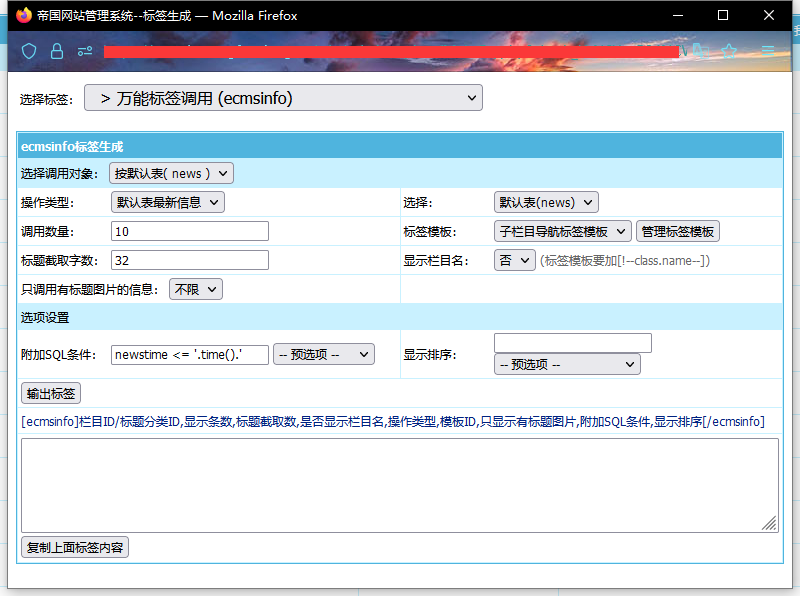
2. Use PHP to modify the publication dates in the Empire Data Table – to allow all tens of millions of articles to have their publication dates set, I wrote two separate PHP scripts!
The first PHP script is responsible for reading all articles from the entire table and generating the corresponding publication dates.
The second PHP script is responsible for setting the scheduled publication times for articles in the database – up to 100 articles can be updated at a time!
This allows for the efficient setting of time parameters without placing a significant burden on the server.