
Foreword:
When adding/modifying fields, you can set "backend information processing function", "backend information modification processing function", "foreground information processing function", and "foreground modification information processing function". You can set functions for processing field content respectively, which are often used for models that have special requirements for the storage format of field content. Today we will briefly explain the processing function production format.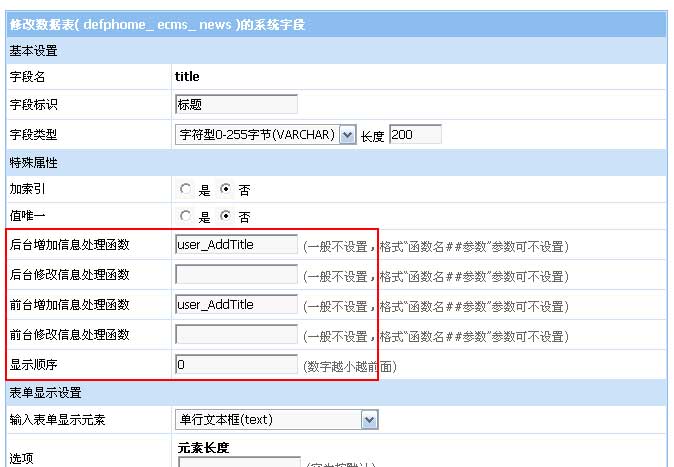
Basic setup steps:
1. Write the processing function;
2. Copy the function to the content of the e/class/userfun.php file;
3. Modify the field setting processing function name.
Field processing function format:
function user_FieldFun($mid,$f,$isadd,$isq,$value,$cs){
        return $value;
}
Parameter description:
user_FieldFun: function name
$mid: system model ID
$f: field name
$isadd: When the value is 1, it is to add information; when the value is 0, it is to modify information.
$isq: When the value is 0, it is background processing; when the value is 1, it is foreground processing.
$value: original content of the field
$cs: field additional parameters, parameter content set at the field processing function
Field processing function example:
Example 1: Automatically add "[EmpireCMS]" in front of the title
Background field function settings: user_AddTitle
function user_AddTitle($mid,$f,$isadd,$isq,$value,$cs){
        $value='[EmpireCMS]'.$value;
        return $value;
}
Example 2: Title content is a combination of writer and befrom fields
Background field function settings: user_TogTitle
The title field displays HTML code: <input type="hidden" name="title" value="test">
(Note: Because the title is a required item, an initial value must be given so that it will not prompt that the content is empty)
function user_TogTitle($mid,$f,$isadd,$isq,$value,$cs){
        $value=$_POST['writer'].$_POST['befrom'];
        return $value;
}
Example 3: Upload images and automatically generate thumbnails
Background field function settings: user_TranImgAuto##170,120
(Note: The background parameter 170 represents the thumbnail width, and 120 is the thumbnail height)
The upload image field displays HTML code: <input type="file" name="titlepicimgrs" size="45">
(Note: The variable name uses "field name" + imgrs, which corresponds to the "$filetf" variable in the function)
function user_TranImgAuto($mid,$f,$isadd,$isq,$value,$cs){
        global $empire,$dbtbpre,$public_r,$emod_r,$class_r,$tranpicturetype,$musername;
        $filetf=$f.'imgrs';//变量名
        if(!$_FILES[$filetf]['name'])
        {
                return $value;
        }
        $classid=(int)$_POST['classid'];
        $id=(int)$_POST['id'];
        $filepass=(int)$_POST['filepass'];
        $filetype=GetFiletype($_FILES[$filetf]['name']);
        $pr=$empire->fetch1("select qaddtran,qaddtransize,qaddtranimgtype from {$dbtbpre}enewspublic limit 1");
        if(!$pr['qaddtran'])
        {
                printerror("CloseQTranPic","",1);
        }
        if(!strstr($pr['qaddtranimgtype'],"|".$filetype."|"))
        {
                printerror("NotQTranFiletype","",1);
        }
        if($_FILES[$filetf]['size']>$pr['qaddtransize']*1024)
        {
                printerror("TooBigQTranFile","",1);
        }
        if(!strstr($tranpicturetype,','.$filetype.','))
        {
                printerror("NotQTranFiletype","",1);
        }
        $tfr=DoTranFile($_FILES[$filetf]['tmp_name'],$_FILES[$filetf]['name'],$_FILES[$filetf]['type'],$_FILES[$filetf]['size'],$classid);
        if($tfr['tran'])
        {
                $csr=explode(',',$cs);
                $maxwidth=$csr[0];
                $maxheight=$csr[1];
                $yname=$tfr['yname'];
                $name=$tfr['name'];
                include_once(ECMS_PATH.'e/class/gd.php');
                //生成缩图
                $filer=ResizeImage($yname,$name,$maxwidth,$maxheight,$public_r['spickill']);
                DelFiletext($yname);
                if($filer['file'])
                {
                        //写入数据库
                        $type=1;
                        $filetime=date("Y-m-d H:i:s");
                        $filesize=@filesize($filer['file']);
                        $filename=GetFilename(str_replace(ECMS_PATH,'',$filer['file']));
                        $adduser='[Member]'.$musername;
                        $infoid=$isadd==1?0:$id;
                        $empire->query("insert into {$dbtbpre}enewsfile(filename,filesize,adduser,path,filetime,classid,no,type,id,cjid,fpath) values('$filename','$filesize','$adduser','$tfr[filepath]','$filetime','$classid','[".$f."]".addslashes(RepPostStr($_POST[title]))."','$type','$infoid','$filepass','$public_r[fpath]');");
                        if($isadd==0)
                        {
                                $tbname=$emod_r[$mid]['tbname'];
                                if(strstr($emod_r[$mid]['tbdataf'],','.$f.','))
                                {
                                        $ir=$empire->fetch1("select stb from {$dbtbpre}ecms_".$tbname." where id='$id'");
                                        $ifr=$empire->fetch1("select ".$f." from {$dbtbpre}ecms_".$tbname."_data_".$ir[stb]." where id='$id'");
                                        $ifval=$ifr[$f];
                                }
                                else
                                {
                                        $ir=$empire->fetch1("select ".$f." from {$dbtbpre}ecms_".$tbname." where id='$id'");
                                        $ifval=$ir[$f];
                                }
                                if($ifval)
                                {
                                        DelYQTranFile($classid,$id,$ifval,$f);
                                }
                        }
                        $value=str_replace($tfr['filename'],$filename,$tfr['url']);
                }
        }
        else
        {
                $value='';
        }
        return $value;
}
The processing function can realize many very complex field content storage format requirements. The above are just a few simple examples, and more need to be practiced by users.