That's it!
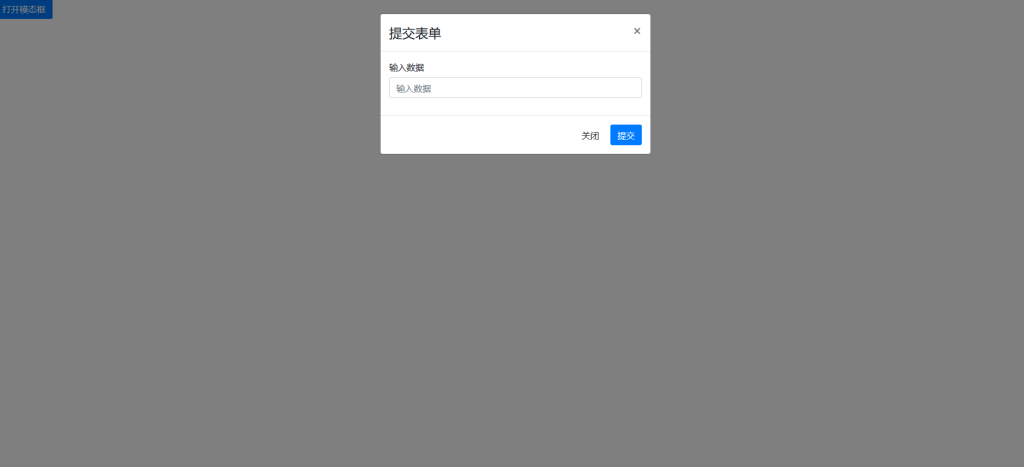
Click the button to open a pop-up window; after submitting the data, you will be returned to the edit page.
Implement code
<!-- 模态框 -->
<div class="modal fade" id="myModal" tabindex="-1" aria-labelledby="myModalLabel" aria-hidden="true">
<div class="modal-dialog">
<div class="modal-content">
<!-- 模态框头部 -->
<div class="modal-header">
<h4 class="modal-title" id="myModalLabel">提交表单</h4>
<button type="button" class="close" data-dismiss="modal" aria-hidden="true">×</button>
</div>
<!-- 模态框主体 -->
<div class="modal-body">
<!-- 表单 -->
<form id="myForm">
<div class="form-group">
<label for="inputData">输入数据</label>
<input type="text" class="form-control" id="inputData" name="inputData" placeholder="输入数据">
</div>
</form>
</div>
<!-- 模态框底部 -->
<div class="modal-footer">
<button type="button" class="btn btn-default" data-dismiss="modal">关闭</button>
<button type="button" class="btn btn-primary" id="submitBtn">提交</button>
</div>
</div>
</div>
</div>
<!-- 按钮 -->
<button type="button" class="btn btn-primary" data-toggle="modal" data-target="#myModal">
打开模态框
</button>
<!-- jQuery 和 Ajax 代码 -->
<script src="https://code.jquery.com/jquery-3.5.1.min.js"></script>
<script>
$(function() {
// 在提交按钮被点击时发送 Ajax 请求
$("#submitBtn").click(function() {
$.ajax({
url: "your_api_url",
type: "POST",
data: $("#myForm").serialize(),
dataType: "json",
success: function(response) {
// 当请求成功时,更新输入框的值为返回的 JSON 数据中的 text 字段
$("#inputData").val(response.text);
// 关闭模态框
$("#myModal").modal("hide");
},
error: function(xhr, status, error) {
// 当请求失败时,修改输入框的值为 "抱歉"
$("#inputData").val("抱歉");
}
});
});
});
</script>In the above code, the modal dialog box contains a form that includes an input field. #inputDataIt will be updated, whether the outcome is successful or not.
When the modal dialog box is opened, users can enter data into the input field and then click the Submit button. #submitBtn Submit the form.
The submit button's click event is bound to an Ajax request; upon successful completion of the request, the input field's value is updated with the JSON data returned from the server. text Field; close the modal dialog box;
When the request fails, set the input field value to "Sorry". Note: Replace. your_api_url Your actual value.