Hongmu Notes
Home Program Notes Empire cms dynamic mode list page pseudo-static, new method
Program Notes Empire cms

Empire cms dynamic mode list page pseudo-static, new method

Empire cms dynamic mode list page pseudo-static, new method

In Empire CMS, the static list will have the problem that the page cannot be updated regularly, and the updated articles cannot be displayed in time. In order to solve this problem, which is not a problem, I wrote a tutorial.

The modified effect is: a link to a static webpage is displayed, but it is actually a webpage in dynamic mode, that is, pseudo-static.

The pseudo-static link is: http(s)://domain name/column file name/index_2.html, something like this!

Pseudo statically generated code

Just put it in the root directory of the website and run it

 隐藏内容:评论后查看
<?php
define('EmpireCMSAdmin','1');
require("e/class/connect.php");
require("e/class/db_sql.php");
require("e/class/functions.php");
$link=db_connect();
$empire=new mysqlquery();
$editor=1;
//验证用户
$logininid=$lur['userid'];
$loginin=$lur['username'];
$loginrnd=$lur['rnd'];
$loginlevel=$lur['groupid'];
$loginadminstyleid=$lur['adminstyleid'];
//ehash
$sql=$empire->query("select classname,classid,classpath from {$dbtbpre}enewsclass");
while($s=$empire->fetch($sql)){
$wjt.= "rewrite ^([^\.]*)/{$s[classpath]}/$ \$1/e/action/ListInfo/index.php?classid={$s[classid]} last;\n";
$wjt.= "rewrite ^([^\.]*)/{$s[classpath]}/index.html$ \$1/e/action/ListInfo/index.php?classid={$s[classid]} last;\n";
$wjt.= "rewrite ^([^\.]*)/{$s[classpath]}/index_(.+?)\.html$ \$1/e/action/ListInfo/index.php?classid={$s[classid]}&page=\$2 last;\n";
$wjt2.= "rewrite ^([^\.]*)/{$s[classpath]}/(.+?)\.html$ \$1/e/action/ShowInfo.php?classid={$s[classid]}&id=\$2 last;\n";

$ap_wjt.= "RewriteRule ^{$s[classpath]}/$  e/action/ListInfo/?classid={$s[classid]}&page=0 \n";
$ap_wjt.= "RewriteRule ^{$s[classpath]}/index.html$  e/action/ListInfo/?classid={$s[classid]}&page=0 \n";
$ap_wjt.= "RewriteRule ^{$s[classpath]}/index_(.+?)\.html$  e/action/ListInfo/?classid={$s[classid]}&page=\$2 \n";
$ap_wjt2.= "RewriteRule ^{$s[classpath]}/(.+?)\.html$ e/action/ShowInfo.php?classid={$s[classid]}&id=\$1 last;\n";
}

?>

Nginx规则:
<pre>
#栏目页
<?=$wjt?>
#内容页
<?=$wjt2?>
</pre>

Apache规则:
<pre>
RewriteEngine On 
RewriteBase / 
#栏目页
<?=$ap_wjt?>
#内容页
<?=$ap_wjt2?>
</pre>

Put the pseudo-static code inside the empire pseudo-static.

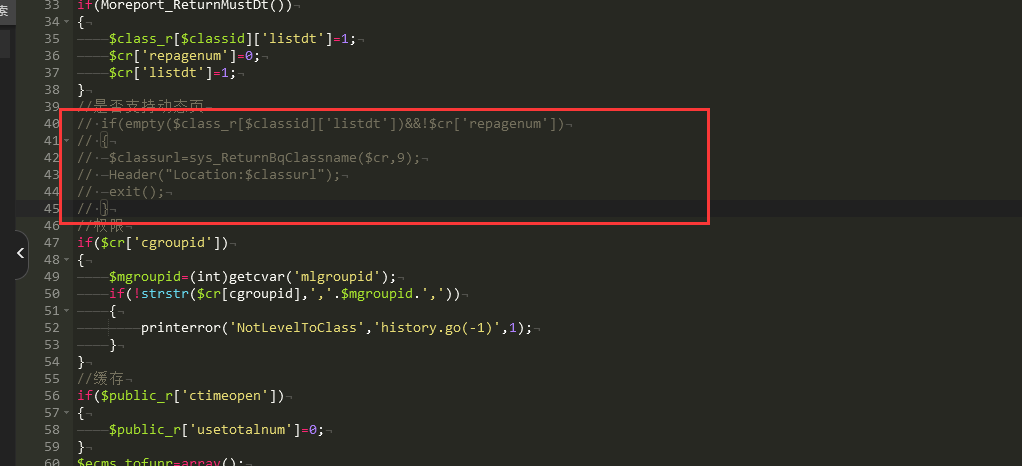
Cancel dynamic page jump

Path:e/action/ListInfo/index.php
20231212152700551-图片

Set static mode pagination links

Empire backstage settings

20231212152834966-图片

Modify the displayed quantity

The total number of records displayed in the Empire backend setting is not effective. If you want to display all pagination, you can set the number of generated static pages to 9999.

If your paging form is dynamic, please set the number of static pages generated.

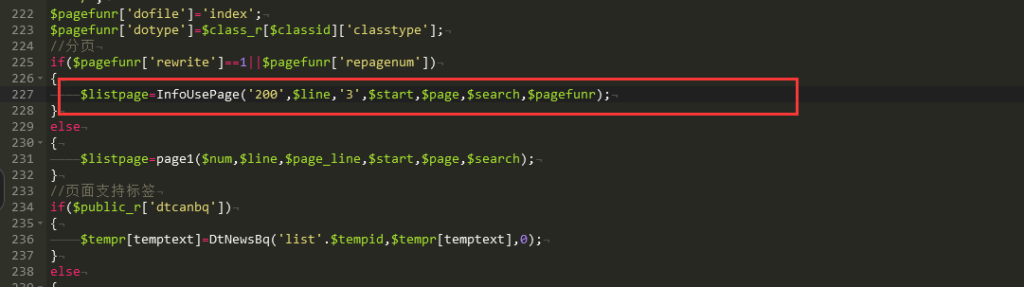
If you only want to display 200 items, you still need to modify the code

Path:e/action/ListInfo/index.php
20231212153022392-图片

200 is the total number of records and 3 is the number of pages.

over!

Now the link has been displayed, but there is a problem with the page markup. I don’t know what is going on, so I customized auser_InfoUsePagefunction to replace the previousInfoUsePagefunction

function user_InfoUsePage($num,$line,$page_line,$start,$page,$search,$add){
	global $fun_r;
	$num=(int)$num;
	$line=(int)$line;
	$page_line=(int)$page_line;
	$start=(int)$start;
	$page=(int)$page;
	if($num<=$line)
	{
		return '';
	}
	$search=RepPostStr($search,1);
	$snum=2;//最小页数
	$totalpage=ceil($num/$line)-1;//取得总页数,如果遇到数量问题,请检查此处
	$firststr='<span class="page now-page">'.$num.'</span>';
	//上一页
	if($page<>0)
	{
		$toppage='<a href="'.eReturnRewritePageLink($add,0).'">'.$fun_r['startpage'].'</a>&nbsp;';
		$pagepr=$page-1;
		$prepage='<a href="'.eReturnRewritePageLink($add,$pagepr).'">'.$fun_r['pripage'].'</a>';
	}
	//下一页
	if($page!=$totalpage-1)
	{
		$pagenex=$page+1;
		$nextpage='&nbsp;<a href="'.eReturnRewritePageLink($add,$pagenex).'">'.$fun_r['nextpage'].'</a>';
		$lastpage='&nbsp;<a href="'.eReturnRewritePageLink($add,$totalpage-1).'">'.$fun_r['lastpage'].'</a>';
	}
	$starti=$page-$snum<0?0:$page-$snum;
	$no=0;
	for($i=$starti;$i<$totalpage&&$no<$page_line;$i++)
	{
		$no++;
// 		echo $page ;
		$pagenum=$i+1;
// 		echo $pagenum."\n";
		
		if($page==$pagenum){
		    $is_1="<span class=\"page now-page\">";
			$is_2="</span>";
		    $returnstr.="&nbsp;".$is_1.$pagenum.$is_2;
		}elseif($page==0 && $pagenum==1){
            $is_1="<span class=\"page now-page\">";
            $is_2="</span>";
            $returnstr.="&nbsp;".$is_1.$pagenum.$is_2;
		}else{
		    $is_1='<a href="'.eReturnRewritePageLink($add,$i).'">';
			$is_2="</a>";
		    $returnstr.="&nbsp;".$is_1.$pagenum.$is_2;
		}
	    
		
	}
	$returnstr=$firststr.$toppage.$prepage.$returnstr.$nextpage.$lastpage;
	return $returnstr;
}

Effect

20231212153100497-图片

微信赞赏

WeChat

支付宝赞赏

Alipay

✍️ Author: Hong Mu

webmaster · Thanks for reading, stay tuned for more exciting content

Author homepage View home page →

Related articles

Empire CMS database statement & SQL statement format

Empire CMS database statement & SQL statement format Program Notes Empire cms

Introduction to Imperial CMS extended SQL program writing, basic examples of Imperial CMS database statements & SQL statement formats: Note: The following examples are based on placing PHP files in the system root directory. Example 1: Connect to MYSQL program. (a.php)<?php require('e/class/connect.php'); //Introduce database configuration files and public function files requ…
👁 351
Empire CMS obtains the system COOKIE variable function getcvar()

Empire CMS obtains the system COOKIE variable function getcvar() Program Notes Empire cms

Get the system COOKIE variable function syntax: getcvar($var,$ecms) Description: $var: is the variable name $ecms: 0 is to set the foreground COOKIE variable, 1 is to set the background COOKIE variable. This parameter can be omitted and defaults to 0. Usage example: getcvar('mlusername'), get the user name of the front-end login member getcvar('loginu...
👁 295
Empire CMS smart label call field collection

Empire CMS smart label call field collection Program Notes Empire cms

Collect and classify all fields that support smart tag calls into Empire CMS smart tags: [e:loop={column ID/topic ID, number of items displayed, operation type, only display pictures with titles, additional SQL conditions, display sorting}] Template code content [/e:loop] Calling time: <?=date('m-d',$bqr[newstime])?> <?=dat…
👁 3749

Recommended reading

Corrosion-resistant wood products construction website template 0516

Corrosion-resistant wood products construction website template 0516 Practical Collection Yiyou template

An EyouCMS website template designed specifically for the防腐木 products and construction industries. Its natural and minimalist design is ideal for showcasing防腐木 products, building materials, project cases, and brand stories. This template helps wood product companies showcase their products online and attract clients in the construction and outdoor industries. Template Display | Installation Instructions | Website Backend: /login.php | Username: admin | Password: admin | Related Articles: Summary of Common Installation Issues for EyouCMS | EyouCMS...
👁 49
Pipeline Unclogging & Building Leak Repair Website Template 0517

Pipeline Unclogging & Building Leak Repair Website Template 0517 Practical Collection Yiyou template

This set of eyoucms templates is suitable for the pipe unblocking and house leak repair industries. It has a professional design style and can display pipe unblocking services, leak repair projects, technical solutions and customer cases. Helps home maintenance companies display their brands online to attract home and business customers. Template display Installation instructions Website backend: /login.php Account: admin Password: admin Related articles Summary of common problems in Yiyou CMS installation Yi...
👁 52
Home Interior Design Studio Website Template 0518

Home Interior Design Studio Website Template 0518 Practical Collection Yiyou template

An eYou CMS website template designed specifically for home design studios. Its creative, modern design style is ideal for showcasing home design projects, spatial planning proposals, design concepts, and brand stories. This template helps home design studios effectively demonstrate their expertise online and attract homeowners and developers. Template Demo | Installation Instructions | Website Backend: /login.php | Username: admin | Password: admin | Related Articles: Summary of Common Installation Issues for eYou CMS | eYou CMS...
👁 40
Resource website typecho001 template

Resource website typecho001 template Program Notes Typecho

typecho001 template template please do not modify the folder name of this template. The folder name is: typecho001 1.4 Fix the js output problem on the article page 1.3 Fix the error prompt when the plug-in is not installed Optimize the list page code output 1.2 Fix the comment function and add a custom homepage title 1.1 Fix the comment reply asymmetry function Add a separate title setting function on the homepage Add the website favicon.ico icon Add one...
👁 198
Art Photography Studio Website Template 0519

Art Photography Studio Website Template 0519 Practical Collection Yiyou template

This EyouCMS template is ideal for art photography studios with a visual arts design style, enabling you to showcase your photographic works, artistic style, photography services, and brand story. It helps photography studios present their portfolio online and attract potential clients. Template Demo | Installation Instructions | Website Backend: /login.php | Username: admin | Password: admin | Related Articles: Summary of Common Installation Issues for EyouCMS | EyouCMS...
👁 49
Modification of typecho paging style

Modification of typecho paging style Program Notes Typecho

Sir, times have changed! Typecho is currently the most perfect solution, because Baidu can only see the code of fixed thinking. The actual generated HTML code is breathtakingly clean and fully customized, including adding classes to the li element, adding classes to the a element, adding classes to the previous page and next page, and removing the li tags that come with typecho to express more. I can even add some text to the content inside...
👁 517