Hongmu Notes
Home Language Notes PHP – Output a website directory tree structure; Directory Tree Browser – Securely displays the tree structure of a specified folder.
Language Notes PHP

PHP – Output a website directory tree structure; Directory Tree Browser – Securely displays the tree structure of a specified folder.

PHP – Output a website directory tree structure; Directory Tree Browser – Securely displays the tree structure of a specified folder.

Directory Tree Browser – Safely displays the tree structure of a specified folder.
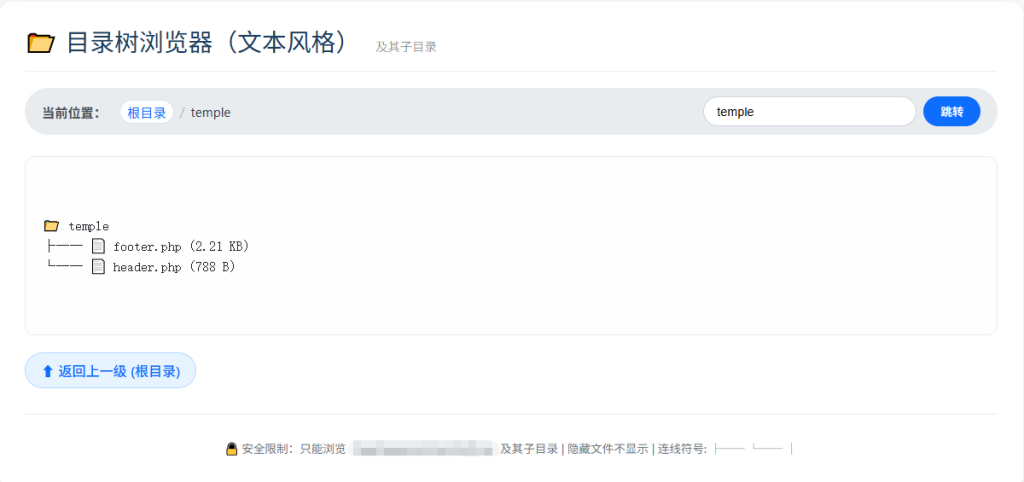
20260320154932124-image


How to use:
1. Place this file in the website's root directory and name it `tree.php` or any other appropriate name.
2. Modify the `TARGET_BASE` constant below to specify the root folder you wish to browse (relative to the website's root directory).
3. Access via browser: http://yourwebsite/tree.php
4. Optional parameter:?dir=subfolder path – Use this to browse subdirectories; e.g.:?dir=images/icons

Safety Features:
-All paths are validated using realpath to prevent directory traversal attacks.
-Access is permitted only to the TARGET_BASE directory and its subdirectories.
-Output is escaped using htmlspecialchars to prevent XSS attacks.

<?php
/**
 * 目录树浏览器(文本风格)- 使用树形连线符号代替缩进空格
 * 
 * 使用方法:
 * 1. 将本文件放置于网站根目录,命名为 tree.php 或其他名称
 * 2. 修改下方的 TARGET_BASE 常量,设置您要浏览的根文件夹(相对于网站根目录)
 * 3. 通过浏览器访问:http://您的网站/tree.php
 * 4. 可选参数 ?dir=子文件夹路径 来浏览子目录,例如:?dir=images/icons
 * 
 * 安全特性:
 * - 所有路径均经过 realpath 验证,防止目录遍历攻击
 * - 只允许访问 TARGET_BASE 目录及其子目录
 * - 输出使用 htmlspecialchars 转义,防止 XSS 攻击
 */

// ---------- 配置区域 ----------
// 定义要浏览的根文件夹(相对于网站根目录 $_SERVER['DOCUMENT_ROOT'])
// 例如:'storage' 表示浏览 /网站根目录/storage
define('TARGET_BASE', '');  // 请修改为您需要显示的文件夹名称

// 是否显示隐藏文件(以点开头的文件/文件夹)
define('SHOW_HIDDEN', false);

// 图标定义(仍保留,使输出更友好)
define('ICON_FOLDER', '');
define('ICON_FILE', '');
// -----------------------------

// 设置时区与编码
date_default_timezone_set('Asia/Shanghai');
header('Content-Type: text/html; charset=utf-8');

// 基础路径:网站根目录下的目标文件夹
$basePath = rtrim($_SERVER['DOCUMENT_ROOT'], DIRECTORY_SEPARATOR) . DIRECTORY_SEPARATOR . TARGET_BASE;
$baseReal = realpath($basePath);

// 检查基目录是否存在且可读
if ($baseReal === false) {
    die("<h2>错误:基目录不存在或不可读</h2><p>请检查配置:<code>" . htmlspecialchars($basePath) . "</code></p>");
}

// 获取请求的子目录参数,并清理
$requestDir = isset($_GET['dir']) ? trim($_GET['dir'], '/\\ ') : '';
$requestDir = str_replace(['../', '..\\'], '', $requestDir); // 额外过滤,但主要依赖 realpath

// 构建完整目标路径
if ($requestDir !== '') {
    // 替换目录分隔符为系统分隔符
    $requestDir = str_replace(['/', '\\'], DIRECTORY_SEPARATOR, $requestDir);
    $targetPath = $baseReal . DIRECTORY_SEPARATOR . $requestDir;
} else {
    $targetPath = $baseReal;
}

// 获取目标路径的真实路径(必须存在)
$targetReal = realpath($targetPath);
if ($targetReal === false) {
    die("<h2>错误:请求的路径不存在或无法访问</h2><p>路径:" . htmlspecialchars($targetPath) . "</p>");
}

// 安全检查:确保目标路径在基目录之下
$baseRealWithSep = $baseReal . DIRECTORY_SEPARATOR;
if (strpos($targetReal . DIRECTORY_SEPARATOR, $baseRealWithSep) !== 0 && $targetReal !== $baseReal) {
    die("<h2>错误:无权访问指定目录</h2>");
}

// 获取当前目录相对于基目录的路径(用于URL)
$relativePath = ($targetReal === $baseReal) ? '' : substr($targetReal, strlen($baseReal) + 1);
$relativePathForUrl = str_replace(DIRECTORY_SEPARATOR, '/', $relativePath);

/**
 * 递归生成文本风格的目录树(带连线符号)
 *
 * @param string $path      绝对路径
 * @param string $prefix    前缀字符串(用于递归构建连线)
 * @return array            每行文本组成的数组
 */
function buildTreeLines($path, $prefix = '') {
    $lines = [];
    $items = @scandir($path);
    if ($items === false) {
        return ['<无法读取目录>'];
    }

    // 过滤掉 . 和 ..
    $items = array_diff($items, ['.', '..']);
    
    // 如果不显示隐藏文件,过滤以点开头的项目
    if (!SHOW_HIDDEN) {
        $items = array_filter($items, function($item) {
            return $item[0] !== '.';
        });
    }

    // 自然排序:文件夹在前,文件在后,各自按名称排序
    $folders = [];
    $files   = [];
    foreach ($items as $item) {
        $fullPath = $path . DIRECTORY_SEPARATOR . $item;
        if (is_dir($fullPath)) {
            $folders[] = $item;
        } else {
            $files[] = $item;
        }
    }
    natcasesort($folders);
    natcasesort($files);
    $sortedItems = array_merge($folders, $files);

    $count = count($sortedItems);
    $i = 0;
    foreach ($sortedItems as $item) {
        $i++;
        $isLast = ($i === $count);
        $fullPath = $path . DIRECTORY_SEPARATOR . $item;
        $safeName = htmlspecialchars($item);
        
        // 选择连接符
        $connector = $isLast ? '└── ' : '├── ';
        
        if (is_dir($fullPath)) {
            // 文件夹行
            $lines[] = $prefix . $connector . ICON_FOLDER . ' ' . $safeName;
            // 递归子文件夹,生成新的前缀
            $subPrefix = $prefix . ($isLast ? '    ' : '│   ');
            $subLines = buildTreeLines($fullPath, $subPrefix);
            $lines = array_merge($lines, $subLines);
        } else {
            // 文件行:附加文件大小
            $size = filesize($fullPath);
            $sizeFormatted = formatBytes($size);
            $lines[] = $prefix . $connector . ICON_FILE . ' ' . $safeName . ' (' . $sizeFormatted . ')';
        }
    }
    return $lines;
}

/**
 * 格式化字节数
 */
function formatBytes($bytes, $precision = 2) {
    $units = ['B', 'KB', 'MB', 'GB', 'TB'];
    $bytes = max($bytes, 0);
    $pow = floor(($bytes ? log($bytes) : 0) / log(1024));
    $pow = min($pow, count($units) - 1);
    $bytes /= (1 << (10 * $pow));
    return round($bytes, $precision) . ' ' . $units[$pow];
}

/**
 * 获取父目录的相对路径(用于返回上一级)
 */
function getParentRelative($currentRelative) {
    if (empty($currentRelative)) {
        return null; // 已经在根目录,无上级
    }
    $parts = explode(DIRECTORY_SEPARATOR, $currentRelative);
    array_pop($parts);
    return implode(DIRECTORY_SEPARATOR, $parts);
}

// 生成当前目录的文本树行数组
$treeLines = buildTreeLines($targetReal);
$treeText = implode("\n", $treeLines);

// 获取当前目录名称(用于显示)
$currentDisplayName = ($targetReal === $baseReal) ? TARGET_BASE . ' (根)' : basename($targetReal);
?>
<!DOCTYPE html>
<html lang="zh">
<head>
    <meta charset="UTF-8">
    <meta name="viewport" content="width=device-width, initial-scale=1.0">
    <title>目录树浏览器(文本风格) - <?php echo htmlspecialchars($currentDisplayName); ?></title>
    <style>
        * {
            box-sizing: border-box;
        }
        body {
            font-family: 'Segoe UI', 'SF Pro Text', 'Helvetica Neue', sans-serif;
            background: #f8f9fa;
            margin: 0;
            padding: 20px;
            color: #2c3e50;
        }
        .container {
            max-width: 1200px;
            margin: 0 auto;
            background: white;
            border-radius: 16px;
            box-shadow: 0 10px 30px rgba(0,0,0,0.1);
            overflow: hidden;
            padding: 25px 30px;
        }
        h1 {
            margin-top: 0;
            font-size: 1.8rem;
            font-weight: 400;
            border-bottom: 1px solid #e9ecef;
            padding-bottom: 15px;
            color: #1e3c5c;
        }
        h1 small {
            font-size: 0.9rem;
            font-weight: 300;
            color: #6c757d;
            margin-left: 10px;
        }
        .path-bar {
            background: #e9ecef;
            border-radius: 30px;
            padding: 10px 20px;
            margin-bottom: 25px;
            display: flex;
            align-items: center;
            flex-wrap: wrap;
            gap: 10px;
            font-size: 0.95rem;
        }
        .path-label {
            font-weight: 600;
            color: #495057;
            margin-right: 5px;
        }
        .path-links {
            display: flex;
            flex-wrap: wrap;
            align-items: center;
            gap: 5px;
        }
        .path-links a {
            color: #0d6efd;
            text-decoration: none;
            padding: 2px 8px;
            border-radius: 20px;
            background: white;
            border: 1px solid #dee2e6;
            transition: 0.2s;
        }
        .path-links a:hover {
            background: #0d6efd;
            color: white;
            border-color: #0d6efd;
        }
        .path-links span.sep {
            color: #adb5bd;
            margin: 0 2px;
        }
        .nav-form {
            margin-left: auto;
            display: flex;
            gap: 8px;
        }
        .nav-form input {
            padding: 8px 15px;
            border-radius: 30px;
            border: 1px solid #ced4da;
            width: 250px;
            font-size: 0.9rem;
        }
        .nav-form button {
            background: #0d6efd;
            color: white;
            border: none;
            border-radius: 30px;
            padding: 8px 20px;
            cursor: pointer;
            font-weight: 500;
            transition: 0.2s;
        }
        .nav-form button:hover {
            background: #0b5ed7;
        }
        /* 文本树样式 */
        .tree-container {
            background: #fefefe;
            border-radius: 12px;
            padding: 20px;
            font-family: 'SF Mono', 'Fira Code', 'Consolas', 'Courier New', monospace;
            font-size: 1rem;
            line-height: 1.5;
            overflow-x: auto;
            border: 1px solid #e9ecef;
            white-space: pre;
            margin: 15px 0;
        }
        .tree-text {
            margin: 0;
            color: #212529;
        }
        .footer {
            margin-top: 30px;
            text-align: center;
            font-size: 0.85rem;
            color: #6c757d;
            border-top: 1px solid #e9ecef;
            padding-top: 15px;
        }
        .footer code {
            background: #e9ecef;
            padding: 2px 6px;
            border-radius: 6px;
        }
        .parent-link {
            display: inline-block;
            background: #e7f3ff;
            color: #0d6efd;
            padding: 8px 18px;
            border-radius: 30px;
            text-decoration: none;
            font-weight: 500;
            border: 1px solid #b8daff;
            transition: 0.2s;
        }
        .parent-link:hover {
            background: #0d6efd;
            color: white;
            border-color: #0d6efd;
        }
    </style>
</head>
<body>
    <div class="container">
        <h1>
             目录树浏览器(文本风格)
            <small><?php echo htmlspecialchars(TARGET_BASE); ?> 及其子目录</small>
        </h1>

        <!-- 路径导航 -->
        <div class="path-bar">
            <span class="path-label">当前位置:</span>
            <div class="path-links">
                <a href="?">根目录</a>
                <?php
                // 生成面包屑导航
                if (!empty($relativePath)) {
                    $parts = explode(DIRECTORY_SEPARATOR, $relativePath);
                    $cumulative = '';
                    echo '<span class="sep">/</span>';
                    foreach ($parts as $index => $part) {
                        $cumulative .= ($cumulative ? DIRECTORY_SEPARATOR : '') . $part;
                        $safePart = htmlspecialchars($part);
                        $url = '?dir=' . urlencode(str_replace(DIRECTORY_SEPARATOR, '/', $cumulative));
                        if ($index === count($parts) - 1) {
                            echo '<span>' . $safePart . '</span>';
                        } else {
                            echo '<a href="' . $url . '">' . $safePart . '</a><span class="sep">/</span>';
                        }
                    }
                }
                ?>
            </div>

            <!-- 快速跳转子目录表单 -->
            <form class="nav-form" method="get" action="">
                <input type="text" name="dir" placeholder="输入子目录路径 (如 images/icons)" value="<?php echo htmlspecialchars($relativePathForUrl); ?>">
                <button type="submit">跳转</button>
            </form>
        </div>

        <!-- 文本树输出 -->
        <div class="tree-container">
            <pre class="tree-text"><?php
                // 输出根目录行,然后输出树内容
                echo ICON_FOLDER . ' ' . htmlspecialchars($currentDisplayName) . "\n";
                echo $treeText;
            ?></pre>
        </div>

        <!-- 父目录链接与说明 -->
        <div style="margin-top: 20px;">
            <?php
            $parentRelative = getParentRelative($relativePath);
            if ($parentRelative !== null):
                $parentUrl = '?dir=' . urlencode(str_replace(DIRECTORY_SEPARATOR, '/', $parentRelative));
            ?>
                <a href="<?php echo $parentUrl; ?>" class="parent-link">⬆ 返回上一级 (<?php echo htmlspecialchars(basename($parentRelative) ?: '根目录'); ?>)</a>
            <?php endif; ?>
        </div>

        <div class="footer">
            <p> 安全限制:只能浏览 <code><?php echo htmlspecialchars($baseReal); ?></code> 及其子目录 | 隐藏文件<?php echo SHOW_HIDDEN ? '显示' : '不显示'; ?> | 连线符号: ├── └── │</p>
        </div>
    </div>
</body>
</html>


微信赞赏

WeChat

支付宝赞赏

Alipay

✍️ Author: Hong Mu

webmaster · Thanks for reading, stay tuned for more exciting content

Author homepage View home page →

Related articles

PHP ob function record

PHP ob function record Language Notes PHP

Usage of the following three functions ob_get_contents(); ob_end_clean(); ob_start(); You can use these functions to buffer local files and execute local script code. Use ob_start() to save the output code into the buffer, and the page will not be displayed; then use ob_get_contents to get the data in the buffer. o…
👁 141
PHP preg

PHP preg Language Notes PHP

The preg_match_all function is used to perform a global regular expression match. preg_match_all() Syntax int preg_match_all ( string $pattern , string $subject [, array &$matches [, int $flags = PREG…
👁 169
Detailed explanation of PHP ternary operator and if

Detailed explanation of PHP ternary operator and if Language Notes PHP

Ternary operator condition ? Result 1 : Result 2 Explanation: The position in front of the question mark is the condition for judgment. If the condition is met, the result is 1, and if it is not met, the result is 2. This article compares and explains the ternary operator and if...else... in detail. I hope it will be helpful to everyone. Today when I was revising my paper online, I encountered a statement that I couldn’t understand: $if_summary = $row['IF_SUMMARY']=…
👁 189
PHP cast type

PHP cast type Language Notes PHP PHP collection PHP and mysql

Get the data type 1. If you want to check the value and type of an expression, use var_dump(). 2. If you just want to get an easy-to-read type expression for debugging, use gettype(). 3. To check a certain type, do not use gettype(), but use the is_type() function. Converting Strings to Numbers When a string is evaluated as a number, the result is determined according to the following rules...
👁 232

Recommended reading

Beauty, Cosmetics & Weight Loss Website Templates – 1047

Beauty, Cosmetics & Weight Loss Website Templates – 1047 Practical Collection Yiyou template

An EyouCMS website template designed for the beauty, cosmetics, and weight loss industries. Its stylish and sophisticated design is ideal for showcasing beauty services, makeup and styling services, weight loss programs, and brand stories. This template helps beauty and weight loss businesses attract female customers online and enhance their brand awareness. Template Display | Installation Instructions | Website Backend: /login.php | Username: admin | Password: admin | Related Articles: Summary of Common Installation Issues for EyouCMS | Eyou...
👁 38
(Adaptive Mobile Version) Website Publishing Page – pbootCMS Website Template (1040)

(Adaptive Mobile Version) Website Publishing Page – pbootCMS Website Template (1040) Practical Collection pbootcms Template

A PbootCMS website template designed for publishing URLs, compatible with both PC and WAP devices. Its clean and practical design makes it ideal for personal or corporate URL navigation and information publishing pages, facilitating the quick sharing and display of important links and information. Template Preview | Installation Instructions | Website Backend: /admin.php | Username: admin | Password: admin | Extraction Password: www.4s5.cn | Related Articles: PbootCMS...
👁 54
Responsive Brand Strategy E-commerce Website Template 0448

Responsive Brand Strategy E-commerce Website Template 0448 Practical Collection Yiyou template

This EyouCMS responsive template is ideal for the brand strategy and e-commerce industries. Its innovative and tech-driven design enables effective presentation of brand strategy projects, e-commerce services, brand identity, and successful case studies. It helps brand and e-commerce companies showcase their professional expertise online and attract corporate clients. Template Display | Installation Instructions | Website Backend: /login.php | Username: admin | Password: admin | Related Articles: Common Questions About EyouCMS Installation...
👁 47
(Adaptive Mobile Version) PBootCMS template for humorous joke websites – Download source code for funny image-based websites – 0476

(Adaptive Mobile Version) PBootCMS template for humorous joke websites – Download source code for funny image-based websites – 0476 Practical Collection pbootcms Template

An adaptive mobile-friendly PbootCMS website template designed for mechanical manufacturing and blue-collar industrial machinery enterprises, ideal for showcasing their product ranges. It helps machinery companies build an online brand presence and attract industrial clients. Template Overview | Installation Instructions | Website Backend: /admin.php | Username: admin | Password: admin | Extraction Password: www.4s5.cn | Related Articles...
👁 56
Medical Skin Health Website Template 1048

Medical Skin Health Website Template 1048 Practical Collection Yiyou template

This EyouCMS template is ideal for the healthcare and dermatology sectors, featuring a professional and clean design that effectively showcases skin care services, health management solutions, expert teams, and successful case studies. It helps dermatology clinics attract patients online and enhance their brand professionalism. Template Preview | Installation Instructions | Website Backend: /login.php | Username: admin | Password: admin | Related Articles: Summary of Common Installation Issues for EyouCMS | EyouCMS...
👁 59
(Adaptive Mobile Version) Website Publishing Page – pbootCMS Website Template (ID: 1041)

(Adaptive Mobile Version) Website Publishing Page – pbootCMS Website Template (ID: 1041) Practical Collection pbootcms Template

A PbootCMS website template designed for publishing URLs, compatible with both PC and WAP devices. Its clean and practical design makes it ideal for personal or corporate URL navigation and information publishing pages, facilitating the quick sharing and display of important links and information. Template Preview | Installation Instructions | Website Backend: /admin.php | Username: admin | Password: admin | Extraction Password: www.4s5.cn | Related Articles: PbootCMS...
👁 54