Hongmu Notes
Home Program Notes Logo image management of Imperial cms website is convenient for subsequent uploading and replacement (use of image information management and PHP call).
Program Notes Empire cms

Logo image management of Imperial cms website is convenient for subsequent uploading and replacement (use of image information management and PHP call).

Logo image management of Imperial cms website is convenient for subsequent uploading and replacement (use of image information management and PHP call).

Using extended variables for managing Empire images is quite inconvenient.

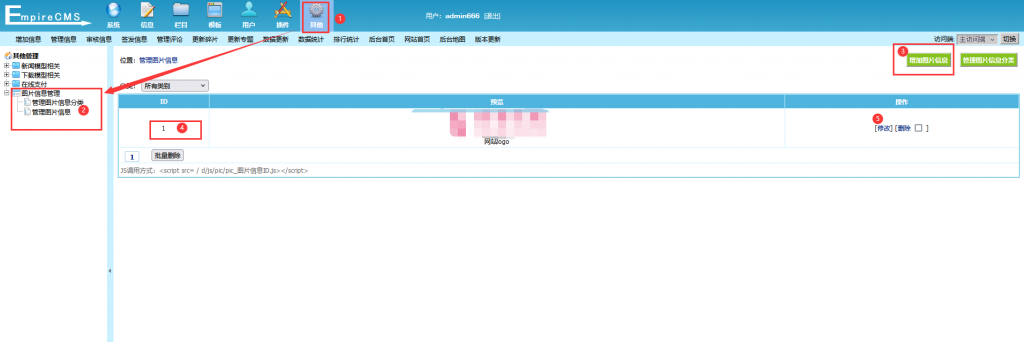
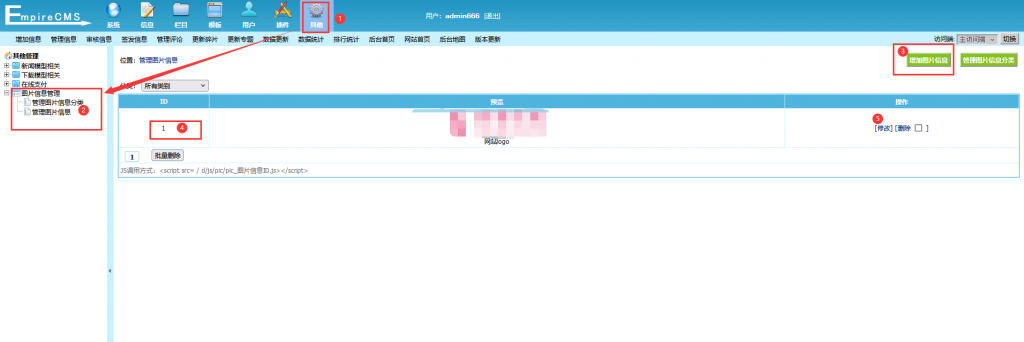
Therefore, you can use the built-in plugin from the Empire:Image Information Management

20240618140523591-图片

Usage instructions: as shown in the figure above – no further explanation needed!

Here is the invocation method!

<div class="logo fl w_img">
<?php  
$img=$empire->fetch1("SELECT * FROM `{$dbtbpre}enewspic` where picid = 1");				
?>
	<img src="<?=$img['pic_url']?>" alt="<?=$public_r['sitename']?>"  title="www.4s5.cn">
</div>

Simply call it in PHP – and it will display right away!

Here, `picid` refers to the image ID; this can be observed in the image above.

What fields can be accessed?

View the data table.
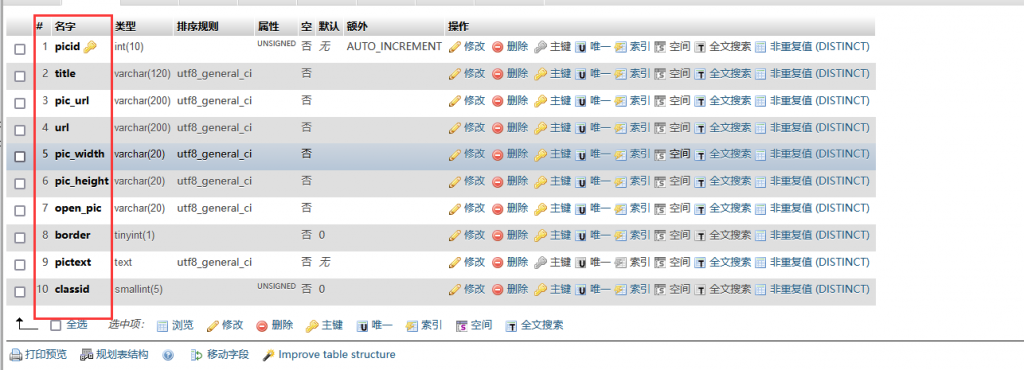
20240618140920772-图片

All of these can be called.

For easy access, the text is listed as follows:

picid
title
pic_url
url
pic_width
pic_height
open_pic
border
pictext
classid


微信赞赏

WeChat

支付宝赞赏

Alipay

✍️ Author: Hong Mu

webmaster · Thanks for reading, stay tuned for more exciting content

Author homepage View home page →

Related articles

Empire CMS database statement & SQL statement format

Empire CMS database statement & SQL statement format Program Notes Empire cms

Introduction to Imperial CMS extended SQL program writing, basic examples of Imperial CMS database statements & SQL statement formats: Note: The following examples are based on placing PHP files in the system root directory. Example 1: Connect to MYSQL program. (a.php)<?php require('e/class/connect.php'); //Introduce database configuration files and public function files requ…
👁 351
Empire CMS obtains the system COOKIE variable function getcvar()

Empire CMS obtains the system COOKIE variable function getcvar() Program Notes Empire cms

Get the system COOKIE variable function syntax: getcvar($var,$ecms) Description: $var: is the variable name $ecms: 0 is to set the foreground COOKIE variable, 1 is to set the background COOKIE variable. This parameter can be omitted and defaults to 0. Usage example: getcvar('mlusername'), get the user name of the front-end login member getcvar('loginu...
👁 295
Empire CMS smart label call field collection

Empire CMS smart label call field collection Program Notes Empire cms

Collect and classify all fields that support smart tag calls into Empire CMS smart tags: [e:loop={column ID/topic ID, number of items displayed, operation type, only display pictures with titles, additional SQL conditions, display sorting}] Template code content [/e:loop] Calling time: <?=date('m-d',$bqr[newstime])?> <?=dat…
👁 3748

Recommended reading

(PC+WAP) FRP Environmental Protection Equipment Category – pbootCMS Website Template; Stainless Steel Website Source Code Download – 0606

(PC+WAP) FRP Environmental Protection Equipment Category – pbootCMS Website Template; Stainless Steel Website Source Code Download – 0606 Practical Collection pbootcms Template

A PbootCMS website template designed for the FRP (fiberglass-reinforced plastic) and stainless steel industries, compatible with both PC and WAP devices. Its industrial-style design effectively showcases the characteristics of FRP products and stainless steel materials. The template includes built-in product display and project case study modules, enabling environmental protection equipment manufacturers to quickly set up their official brand websites. Template Display | Installation Instructions | Website Backend: /admin.php | Username: admin | Password: admin...
👁 33
Warning: mysqli_fetch_assoc() expects parameter 1 to be mysqli_result, bool given in

Warning: mysqli_fetch_assoc() expects parameter 1 to be mysqli_result, bool given in Language Notes PHP PHP and mysql

This warning typically indicates that your SQL query has failed, causing the `mysqli::query()` function to return the boolean value `false` instead of a valid `mysqli_result` object. This can occur for various reasons, such as: a syntax or logic error in the SQL query; the absence or unavailability of the target table or database; or an error during database connection (e.g., invalid credentials or hostname). To resolve this issue...
👁 1885
Responsive Precision Instrument Manufacturing Website Template 0654

Responsive Precision Instrument Manufacturing Website Template 0654 Practical Collection Yiyou template

An eyouCMS responsive website template designed specifically for the precision instrumentation manufacturing industry. Its professional and sophisticated design is ideal for showcasing instrument products, manufacturing processes, technical specifications, and scientific research applications. This template helps precision instrumentation companies present their products online and attract both research and industrial clients. Template Overview | Installation Instructions | Website Backend: /login.php | Username: admin | Password: admin | Related Articles: Summary of Common Installation Issues for YououCMS...
👁 35
Responsive Workwear Custom Design Corporate Website Template 0032

Responsive Workwear Custom Design Corporate Website Template 0032 Practical Collection Yiyou template

This set of eyoucms responsive templates is suitable for companies that design and customize work clothes. The design style is professional and fashionable, and can display customized services such as work clothes, uniforms, and professional attire. It helps clothing customization companies display their processes and cases online to attract corporate customers. Template display Installation instructions Website backend: /login.php Account: admin Password: admin Related articles Yiyou CMS installation FAQ summary Yiyou CMS (…
👁 38