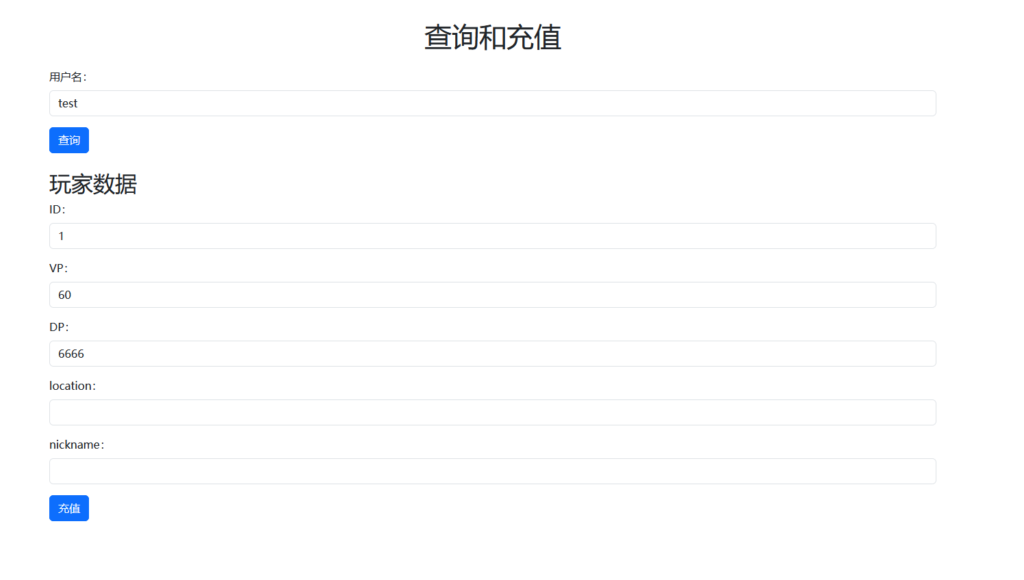
The screenshot is as follows:
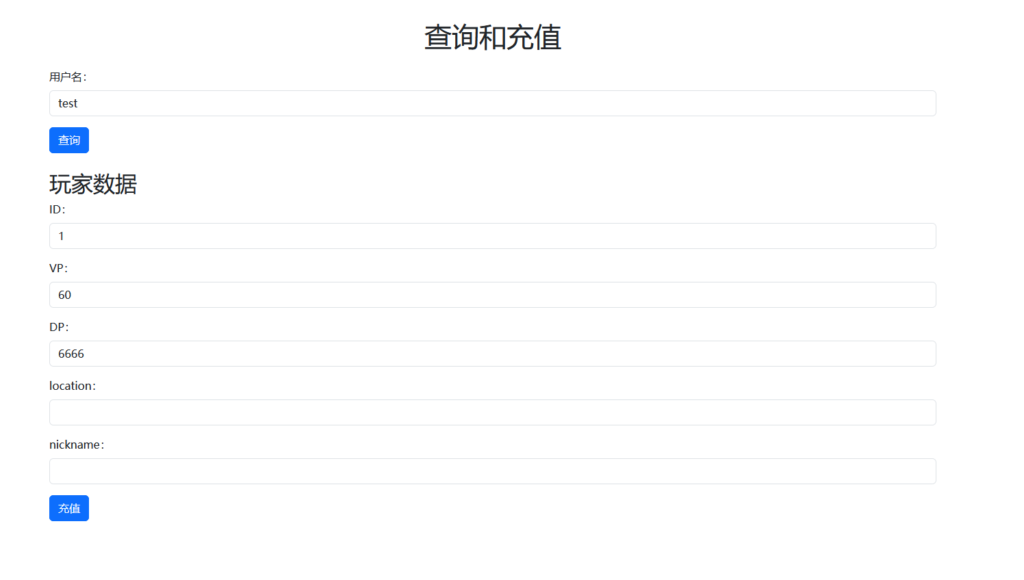
Home page (index.html)
<!DOCTYPE html>
<html lang="en">

<head>
    <meta charset="UTF-8">
    <meta name="viewport" content="width=device-width, initial-scale=1.0">
    <title>查询和充值</title>
    <!-- 引入 Bootstrap 样式 -->
    <link href="https://cdn.bootcdn.net/ajax/libs/twitter-bootstrap/5.3.1/css/bootstrap.min.css" rel="stylesheet">
</head>

<body>
    <div class="container mt-5">
        <h1 class="text-center mb-4">查询和充值</h1>

        <form id="queryForm">
            <div class="mb-3">
                <label for="username" class="form-label">用户名:</label>
                <input type="text" class="form-control" id="username">
            </div>
            <button type="submit" class="btn btn-primary">查询</button>
        </form>

        <div id="loading" class="text-center mt-3" style="display: none;">
            <div class="spinner-border text-primary" role="status"></div>
            <div class="mt-2">加载中...</div>
        </div>

        <div id="playerData" class="mt-4" style="display: none;">
            <h2>玩家数据</h2>
            <div class="mb-3">
                <label for="id" class="form-label">ID:</label>
                <input type="text" class="form-control" id="id" readonly>
            </div>
            <div class="mb-3">
                <label for="vp" class="form-label">VP:</label>
                <input type="text" class="form-control" id="vp">
            </div>
            <div class="mb-3">
                <label for="dp" class="form-label">DP:</label>
                <input type="text" class="form-control" id="dp">
            </div>
            <div class="mb-3">
                <label for="location" class="form-label">location:</label>
                <input type="text" class="form-control" id="location">
            </div>
            <div class="mb-3">
                <label for="nickname" class="form-label">nickname:</label>
                <input type="text" class="form-control" id="nickname">
            </div>
            <button id="rechargeBtn" class="btn btn-primary">充值</button>
        </div>

        <div id="log" class="mt-4"></div>

        <!-- 引入 jQuery -->
        <script src="https://cdn.bootcdn.net/ajax/libs/jquery/3.6.0/jquery.min.js"></script>
        <!-- 引入 Bootstrap JS -->
        <script src="https://cdn.bootcdn.net/ajax/libs/twitter-bootstrap/5.3.1/js/bootstrap.bundle.min.js"></script>
        <script>
		$(document).ready(function() {
			// 绑定表单提交事件
			$('#queryForm').submit(function(event) {
				event.preventDefault();
				var username = $('#username').val();

				// 显示加载动画
				$('#loading').show();
				$('#playerData').hide();

				// 发送POST请求
				$.ajax({
					url: 'account.php',
					type: 'POST',
					dataType: 'json',
					data: { username: username },
					success: function(response) {
						// 隐藏加载动画
						$('#loading').hide();

						if (response.error) {
							// 显示错误信息
							alert(response.error);
						} else {
							// 显示玩家数据
							var playerData = response.playerData;
							for (var i = 0; i < playerData.length; i++) {
								var id = playerData[i].id;
								var vp = playerData[i].vp;
								var dp = playerData[i].dp;
								var location = playerData[i].location;
								var nickname = playerData[i].nickname;

								// 将数据显示在页面上的相应元素中
								$('#id').val(id);
								$('#vp').val(vp);
								$('#dp').val(dp);
								$('#location').val(location);
								$('#nickname').val(nickname);
							}

							// 显示玩家数据区域
							$('#playerData').show();

							// 显示日志信息
							var logInfo = response.logInfo;
							for (var i = 0; i < logInfo.length; i++) {
								var logMessage = '充值ID' + logInfo[i].id+ ':' + logInfo[i].logTime + '充值,充值后数据为:【vp:' + logInfo[i].vp + '】' + '【dp:' + logInfo[i].dp + '】';
								$('#log').append('<p>' + logMessage + '</p>');
							}
						}
					},
					error: function() {
						// 隐藏加载动画
						$('#loading').hide();
						alert('请求出错');
					}
				});
			});

			// 绑定充值按钮点击事件
			$('#rechargeBtn').click(function() {
				var id = $('#id').val();
				var vp = $('#vp').val();
				var dp = $('#dp').val();
				var location = $('#location').val();
				var nickname = $('#nickname').val();

				// 显示充值中的加载动画
				$('#rechargeBtn').html('<div class="spinner-border spinner-border-sm" role="status"></div> 充值中...');
				$('#rechargeBtn').attr('disabled', true);

				// 发送POST请求
				$.ajax({
					url: 'recharge.php',
					type: 'POST',
					dataType: 'json',
					data: { id: id, vp: vp, dp: dp, location: location, nickname: nickname },
					success: function(response) {
						if (response.success) {
							alert('充值成功');

							// 重新查询数据
							$.ajax({
								url: 'account.php',
								type: 'POST',
								dataType: 'json',
								data: { username: $('#username').val() },
								success: function(response) {
									if (!response.error) {
										// 更新玩家数据
										var playerData = response.playerData;
										for (var i = 0; i < playerData.length; i++) {
											var id = playerData[i].id;
											var vp = playerData[i].vp;
											var dp = playerData[i].dp;
											var location = playerData[i].location;
											var nickname = playerData[i].nickname;

											// 将数据显示在页面上的相应元素中
											$('#id').val(id);
											$('#vp').val(vp);
											$('#dp').val(dp);
											$('#location').val(location);
											$('#nickname').val(nickname);
										}
									}
								},
								error: function() {
									alert('请求出错');
								}
							});
						} else {
							alert('充值失败,请重试');
						}

						// 恢复充值按钮状态
						$('#rechargeBtn').html('充值');
						$('#rechargeBtn').attr('disabled', false);
					},
					error: function() {
						alert('请求出错');
						// 恢复充值按钮状态
						$('#rechargeBtn').html('充值');
						$('#rechargeBtn').attr('disabled', false);
					}
				});
			});
		});
        </script>
    </div>
</body>

</html>
account.php
<?php
require('./config.php');

// 获取玩家用户名
$username = $_POST['username'];

// 准备查询玩家ID的SQL语句,并绑定参数
$stmt1 = $conn1->prepare("SELECT id FROM account WHERE username = ?");
$stmt1->bind_param("s", $username);
$stmt1->execute();
$result1 = $stmt1->get_result();

if ($result1->num_rows > 0) {
    $row1 = $result1->fetch_assoc();
    $playerId = $row1["id"];

    // 准备查询玩家数据的SQL语句,并绑定参数
    $stmt2 = $conn2->prepare("SELECT * FROM account_data WHERE id = ?");
    $stmt2->bind_param("i", $playerId);
    $stmt2->execute();
    $result2 = $stmt2->get_result();

    if ($result2->num_rows > 0) {
        $playerData = array();
        while ($row2 = $result2->fetch_assoc()) {
            $playerData[] = $row2;
        }

        // 查询日志信息
        $stmt_log = $conn1->prepare("SELECT * FROM account_pay_logs WHERE userID = ?");
        $stmt_log->bind_param("i", $playerId);
        $stmt_log->execute();
        $result_log = $stmt_log->get_result();
        $logInfo = array();
        while ($row_log = $result_log->fetch_assoc()) {
            $logInfo[] = $row_log;
        }

        // 创建包含玩家数据和日志信息的关联数组
        $responseData = array(
            'playerData' => $playerData,
            'logInfo' => $logInfo
        );

        // 返回JSON数据
        echo json_encode($responseData);
    } else {
        // 返回错误信息
        echo json_encode(array('error' => '未找到玩家数据'));
    }
} else {
    // 返回错误信息
    echo json_encode(array('error' => '未找到玩家'));
}

closeMysqli();
?>
recharge.php
<?php
require('./config.php');

// 获取表单数据
$id = $_POST['id'];
$vp = $_POST['vp'];
$dp = $_POST['dp'];
$location = empty($_POST['location'])?" ":$_POST['location'];
$nickname = empty($_POST['nickname'])?" ":$_POST['nickname'];

// 验证输入数据
if (!is_numeric($id) || !is_numeric($vp) || !is_numeric($dp) || empty($location) || empty($nickname)) {
    $result = array('success' => false, 'error' => 'Invalid input');
    echo json_encode($result);
    exit();
}

$time = date("Y-m-d H:i:s");
// 准备更新语句,并绑定参数
$stmt = $conn2->prepare("UPDATE account_data SET vp=?, dp=?, location=?, nickname=? WHERE id=?");
$stmt->bind_param("iissi", $vp, $dp, $location, $nickname, $id);

if ($stmt->execute()) {
    // 如果更新成功,插入日志到account_pay_logs表
    $stmt_log = $conn1->prepare("INSERT INTO account_pay_logs (userID, vp, dp, location, nickname, logTime) VALUES (?, ?, ?, ?, ?, ?)");
    if ($stmt_log === false) {
        die("Prepare failed: " . $conn1->error);
    }
    $stmt_log->bind_param("iiisss", $id, $vp, $dp, $location, $nickname, $time);

    if ($stmt_log->execute()) {
        $result = array('success' => true);
    } else {
        $result = array('success' => false, 'error' => $conn1->error);
    }

    echo json_encode($result);
} else {
    $result = array('success' => false, 'error' => $conn2->error);
    echo json_encode($result);
}

closeMysqli();
?>
Configure config.php








![PHP Character Replacement / 20230101/ This date is not fixed $_POST[newstext]=str_replace('/file/20230101/','/file/',$_Post[newstext]);](/wp-content/uploads/titlepic/394.webp)