I was using PHP to handle navigation, but since many of my users didn't know PHP, they frequently reached out to me with questions. As a result, I've revised the code; this time, I've separated the PHP logic from the HTML code.
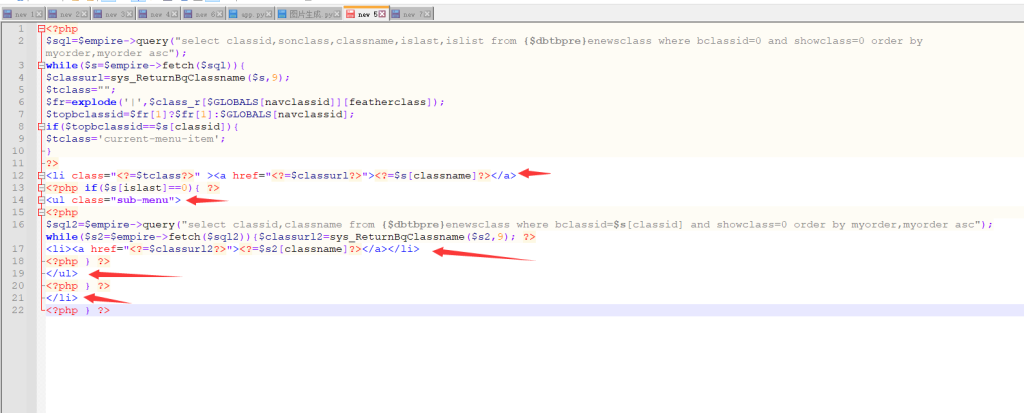
After separation, you can see that the code is now much clearer than before.Empire Navigation calls advanced php codeThis article provides a comparison – in fact, as long as you have a basic understanding of HTML, you can easily comprehend the modifications!
Here is the code:
隐藏内容:登录后可查看
<?php
$sql=$empire->query("select classid,sonclass,classname,islast,islist from {$dbtbpre}enewsclass where bclassid=0 and showclass=0 order by myorder,myorder asc");
while($s=$empire->fetch($sql)){
$classurl=sys_ReturnBqClassname($s,9);
$tclass="";
$fr=explode('|',$class_r[$GLOBALS[navclassid]][featherclass]);
$topbclassid=$fr[1]?$fr[1]:$GLOBALS[navclassid];
if($topbclassid==$s[classid]){
$tclass='current-menu-item';
}
?>
<li class="<?=$tclass?>" ><a href="<?=$classurl?>"><?=$s[classname]?></a>
<?php if($s[islast]==0){ ?>
<ul class="sub-menu">
<?php
$sql2=$empire->query("select classid,classname from {$dbtbpre}enewsclass where bclassid=$s[classid] and showclass=0 order by myorder,myorder asc");while($s2=$empire->fetch($sql2)){$classurl2=sys_ReturnBqClassname($s2,9); ?>
<li><a href="<?=$classurl2?>"><?=$s2[classname]?></a></li>
<?php } ?>
</ul>
<?php } ?>
</li>
<?php } ?>