從小到大給大家實現一波!
點擊複製不提示
// 給複製按鈕綁定點擊事件
$('#copyBtn').on('click', function() {
  // 選擇要複製的文本
  var text = $('#inputBox').val();

  // 創建一個臨時的textarea元素,並將文本設置爲它的值
  var $temp = $('<textarea>');
  $('body').append($temp);
  $temp.val(text).select();

  // 複製文本到剪貼板
  document.execCommand('copy');

  // 移除臨時元素
  $temp.remove();
});
點擊複製,彈窗提示
// 給複製按鈕綁定點擊事件
$('#copyBtn').on('click', function() {
  // 選擇要複製的文本
  var text = $('#inputBox').val();

  // 創建一個臨時的textarea元素,並將文本設置爲它的值
  var $temp = $('<textarea>'); // 創建一個臨時的textarea元素
  $('body').append($temp); // 將臨時元素添加到頁面中
  $temp.val(text).select(); // 將文本設置爲臨時元素的值,並選中文本

  // 複製文本到剪貼板
  document.execCommand('copy');

  // 移除臨時元素
  $temp.remove();

  // 彈出提示框
  alert('已複製到剪貼板');
});
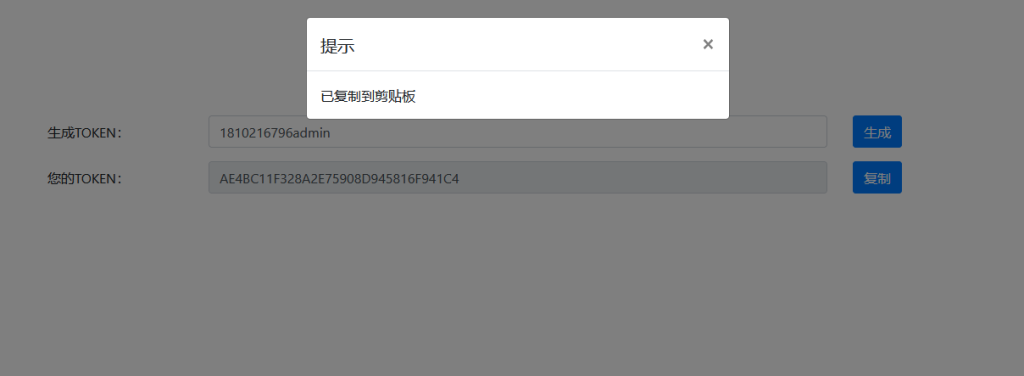
點擊複製boostrap彈窗提示
<!-- 引入 Bootstrap 樣式文件和 JavaScript 文件 -->
<link rel="stylesheet" href="https://cdn.bootcdn.net/ajax/libs/bootstrap/4.6.0/css/bootstrap.min.css">
<script src="https://cdn.bootcdn.net/ajax/libs/jquery/3.6.0/jquery.min.js"></script>
<script src="https://cdn.bootcdn.net/ajax/libs/bootstrap/4.6.0/js/bootstrap.min.js"></script>
<!-- 在頁面中添加一個 Bootstrap 彈窗提示的容器 -->
<div class="modal fade" id="copyModal" tabindex="-1" aria-hidden="true">
<div class="modal-dialog">
<div class="modal-content">
<div class="modal-header">
<h5 class="modal-title">提示</h5>
<button type="button" class="close" data-dismiss="modal" aria-label="關閉">
<span aria-hidden="true">×</span>
</button>
</div>
<div class="modal-body">
已複製到剪貼板
</div>
</div>
</div>
</div>
<!-- 在 JavaScript 中綁定複製按鈕的點擊事件 -->
<script>
$('#copyBtn').on('click', function() {
var text = $('#inputBox').val();
var $temp = $('<textarea>');
$('body').append($temp);
$temp.val(text).select();
document.execCommand('copy');
$temp.remove();
$('#copyModal').modal('show'); // 顯示 Bootstrap 彈窗提示
});
</script>最後的效果