


QQ交流群:958972323
所需工具:
本地服务器环境:https://www.xp.cn/
网站域名 127.0.0.1
帝国cms8.0 下载地址:http://www.phome.net/down/
编辑器:Notepad++
页面下载工具:仿站小工具
在线html格式化:在线HTML代码格式化 – HTML代码美化工具
页面类型:
首页:https://simplee.001666.cn/
列表页:https://simplee.001666.cn/info/
内容页:https://simplee.001666.cn/blog/265.html
导航代码调用:
<?php
// 查询一级菜单
$sql = $empire->query("select classid, sonclass, classname, islast, islist from {$dbtbpre}enewsclass where bclassid=0 and showclass=0 order by myorder asc");
while ($primaryMenu = $empire->fetch($sql)) {
    $classUrl = sys_ReturnBqClassname($primaryMenu, 9);
    $topClass = '';
    $featherClass = explode('|', $class_r[$GLOBALS['navclassid']]['featherclass']);
    $topbclassid = $featherClass[1] ? $featherClass[1] : $GLOBALS['navclassid'];

    // 判断是否为当前菜单
    if ($topbclassid == $primaryMenu['classid']) {
        $topClass = 'active';
    }
    //$value=ReturnClassAddField($primaryMenu['classid'],'icon');
?>
						<li id="navbar-category-1" class="<?=$topClass?>">
                            <a href="<?=$classUrl?>">
                                <i class="fa <?=$value?>"></i><?=$primaryMenu['classname']?>
                            </a>
                        </li>

<?}?>站点图标库:图标库 – Font Awesome 中文网
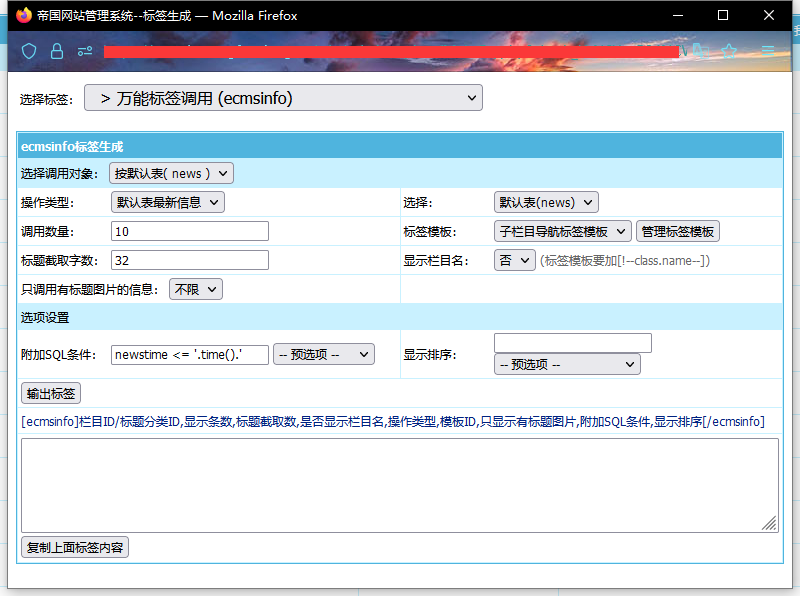
万能标签调用文章:
[!--empirenews.listtemp--]<!--list.var1-->[!--empirenews.listtemp--]灵动标签调用文章:
TAG调用:
<?php
$num=$empire->num("select tagid from {$dbtbpre}enewstags");
$randnum=100;
$randids='';
$randdh='';
for($i=1;$i<=$randnum;$i++)
{
$randids.=$randdh.rand(1,$num);
$randdh=',';
}
?>
[e:loop={"select tagname,tagid,num from phome_enewstags where tagid in ($randids)  limit $randnum",32,24,0}]
<a target="_blank" href="/tag/<?=$bqr['tagid']?>/" title="<?=$bqr['tagname']?>"><?=$bqr['tagname']?></a> |
[/e:loop]
友情链接调用:
首页标题的调用:
分页调用
方法一:修改css,达到仿站效果(推荐指数二颗星)
难度较高:灵活调用,需要懂css,能根据目标站点,修改css代码
.pagination .navigation a,.pagination span {background-color:#fff;line-height:28px;height:28px;width:60px;text-align:center;margin:0 10px 0 0;display:block;float:left;color:#000;box-shadow:0 0 5px rgba(0,0,0,0.2);position:relative}

.pagination .navigation>b {
    background-color: #fff;
    line-height: 28px;
    height: 28px;
    width: 60px;
    text-align: center;
    margin: 0 10px 0 0;
    display: block;
    float: left;
    color: #000;
    box-shadow: 0 0 5px rgba(0, 0, 0, 0.2);
    position: relative;
    font-weight: 400;
}
方法二:自定义分页函数(推荐指数一颗星)
难度中等:修改php文件中的html结构,通过结构适配css代码。
<?php
//---------------------------用户自定义标签函数文件
//列表模板之列表式分页
function usr_ShowListMorePage($num,$page,$dolink,$type,$totalpage,$line,$ok,$search="",$add=null){
global $fun_r,$public_r;
if($num<=$line)
{
$pager['showpage']='';
return $pager;
}
//文件名
if(empty($add['dofile']))
{
$add['dofile']='index';
}
//静态页数
$repagenum=$add['repagenum'];
$page_line=$public_r['listpagelistnum'];
$snum=2;
//$totalpage=ceil($num/$line);//取得总页数
$firststr='';
//上一页
if($page<>1)
{
$toppage='<a class="page-numbers" title="第<<页" href="'.$dolink.$add['dofile'].$type.'"><span class="page"><<</span></a>';
$pagepr=$page-1;
if($pagepr==1)
{
$prido=$add['dofile'].$type;
}
else
{
$prido=$add['dofile'].'_'.$pagepr.$type;
}
$prepage='<a class="page-numbers" href="'.$dolink.$prido.'"><span class="page"><</span></a>';
}
//下一页
if($page!=$totalpage)
{
$pagenex=$page+1;
$nextpagelink=$repagenum&&$repagenum<$pagenex?eReturnRewritePageLink2($add,$pagenex):$dolink.$add['dofile'].'_'.$pagenex.$type;
$lastpagelink=$repagenum&&$repagenum<$totalpage?eReturnRewritePageLink2($add,$totalpage):$dolink.$add['dofile'].'_'.$totalpage.$type;
$nextpage='<a href="'.$nextpagelink.'"><span class="page">></span></a>';
$lastpage='<a href="'.$lastpagelink.'"><span class="page">>></span></a>';
}
$starti=$page-$snum<1?1:$page-$snum;
$no=0;
for($i=$starti;$i<=$totalpage&&$no<$page_line;$i++)
{
$no++;
if($page==$i)
{
$is_1="<span class=\"page now-page\">";
$is_2="</span>";
}
elseif($i==1)
{
$is_1='<a href="'.$dolink.$add['dofile'].$type.'">';
$is_2="</a>";
}
else
{
$thispagelink=$repagenum&&$repagenum<$i?eReturnRewritePageLink2($add,$i):$dolink.$add['dofile'].'_'.$i.$type;
$is_1='<a href="'.$thispagelink.'">';
$is_2="</a>";
}
$returnstr.=' '.$is_1.$i.$is_2;
}
$returnstr=$firststr.$toppage.$prepage.$returnstr.$nextpage.$lastpage;
$pager['showpage']=$returnstr;
return $pager;
}
?>方法三:修改帝国核心配置文件(不推荐)
难度中等:修改php文件中的html结构,通过结构适配css代码。
不建议原因:核心文件,能不修改,则不修改
评论表单
<script>
function CheckPl(obj)
{
if(obj.saytext.value=="")
{
alert("您没什么话要说吗?");
obj.saytext.focus();
return false;
}
return true;
}
</script><form action="[!--news.url--]e/pl/doaction.php" method="post" name="saypl" id="saypl" onsubmit="return CheckPl(document.saypl)">
<table width="100%" border="0" cellpadding="0" cellspacing="0" id="plpost">
<tr>
<td><table width="100%" border="0" cellpadding="0" cellspacing="0" class="title">
<tr>
<td><strong>发表评论</strong></td>
<td align="right"><a href="[!--news.url--]e/pl/?classid=[!--classid--]&id=[!--id--]">共有<span><script type="text/javascript" src="[!--news.url--]e/public/ViewClick/?classid=[!--classid--]&id=[!--id--]&down=2"></script></span>条评论</a></td>
</tr>
</table>
<table width="100%" border="0" cellspacing="10" cellpadding="0">
<tr>
<td><table width="100%" border="0" cellpadding="0" cellspacing="2">
<tr>
<td width="56%" align="left">用户名:
<input name="username" type="text" class="inputText" id="username" value="" size="16" /></td>
<td width="44%" align="left">密码:
<input name="password" type="password" class="inputText" id="password" value="" size="16" /></td>
</tr>
<tr>
<td align="left">验证码:
<input name="key" type="text" class="inputText" size="10" />
<img src="[!--news.url--]e/ShowKey/?v=pl" align="absmiddle" name="plKeyImg" id="plKeyImg" onclick="plKeyImg.src='[!--news.url--]e/ShowKey/?v=pl&t='+Math.random()" title="看不清楚,点击刷新" /> </td>
<td align="left"><input name="nomember" type="checkbox" id="nomember" value="1" checked="checked" />
匿名发表</td>
</tr>
</table>
<textarea name="saytext" rows="6" id="saytext"></textarea><input name="imageField" type="image" src="[!--news.url--]e/data/images/postpl.gif"/>
<input name="id" type="hidden" id="id" value="[!--id--]" />
<input name="classid" type="hidden" id="classid" value="[!--classid--]" />
<input name="enews" type="hidden" id="enews" value="AddPl" />
<input name="repid" type="hidden" id="repid" value="0" />
<input type="hidden" name="ecmsfrom" value="[!--titleurl--]"></td>
</tr>
</table>
</td>
</tr>
</table></form>
© 版权声明
文章版权归作者所有,未经允许请勿转载。
THE END




![表情[aoman]-红穆笔记](https://www.4s5.cn/wp-content/themes/zibll/img/smilies/aoman.gif)




暂无评论内容